
How to Transfer a Tattoo Stencil Without a Thermal Printer
Direct answer
To transfer a tattoo stencil without a thermal printer, print the design at final size on plain paper, tape it over a hectograph (freehand carbon) pack, and trace every line with a 0.7 mm ballpoint pen so the purple carbon layer picks up the drawing. Apply with a thin, tacky coat of stencil fluid, press for 30 to 60 seconds without sliding, and let it dry 10 to 20 minutes before anything touches it. Budget 10 to 40 minutes of tracing for a mid-size piece, and expect detail closer than about 1 mm to close up. InkLine's Outline mode and print layout give you the clean, correctly sized sheet to trace from.
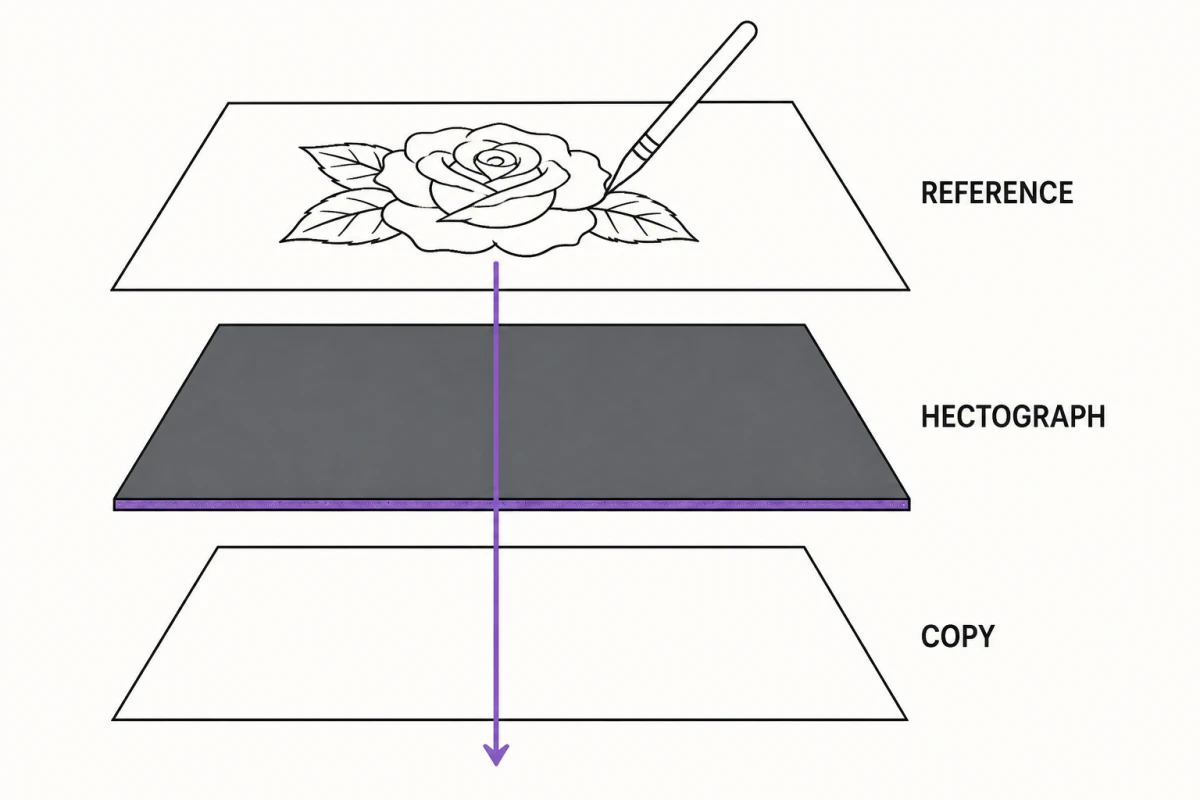
A thermal stencil printer is the fastest way to get a design onto skin, but it was never the only way, and it was not the original way. Hand transfer built most of the tattoos made before the mid-2000s. What follows is the method that actually holds for a full session, how long each step really takes, and where hand transfer falls short of a thermal unit badly enough that you should plan around it.
Print the outline, then trace it onto hectograph paper
The single highest-yield method is a hybrid: let a normal printer handle the drawing accuracy, and let your hand handle only the carbon transfer. Trying to freehand a whole design onto hectograph paper from a reference is where most people lose proportion and burn an hour.
Start with the linework. A stencil needs closed, deliberate contours, not gray tone — anything soft becomes an ambiguous smudge in carbon. If you are working from a photo, convert it to line art first; InkLine’s Outline mode produces contour linework, and the Cleanup slider removes the speckle that otherwise gives you dozens of meaningless one-millimeter marks to trace. Be realistic about the source: below roughly 1000 px on the long edge, a photo cannot be rescued into a clean stencil, and you are redrawing rather than converting.
Then print at final size on plain copy paper. Not on the hectograph sheet — the printed sheet is a template you trace through, and it gets thrown away. Getting the millimeters right at this stage is the whole game, and it is covered in detail in printing a tattoo stencil at home. If the design is larger than one sheet, tile it and trace each tile onto its own hectograph sheet, copying the registration marks along with the linework, so the sections line up again on skin. InkLine’s tiled sheets make that easier than most: every seam carries three circle-and-cross marks inside a 15 mm overlap, and every sheet is labelled with its place in the grid, such as “A1 · 1/4”.
Now build the stack. A hectograph pack is typically four layers: a white top sheet, a yellow protective sheet, the purple carbon sheet, and a backing. Pull the yellow sheet out so the carbon layer sits directly beneath the top sheet with its purple side facing up. Lay the printed outline over the top sheet and tape all four edges down to a hard, flat surface. Tape matters more than it sounds: a two-millimeter shift halfway through produces doubled lines that look correct on paper and read as a blurry mess on skin.
Trace with a 0.7 mm ballpoint at steady medium pressure. A pencil deposits too little pressure and sheds graphite over the sheet. A fine gel or rollerball tip skips on the coated surface and leaves broken carbon. Work systematically in one direction so your palm never rests on an area you already traced, and finish long curves in single strokes rather than chaining short ones. For a mid-size forearm piece, expect 10 to 40 minutes.
Before you pull the tape, lift one corner and check the underside of the top sheet. Pale runs and skipped segments are trivial to fix while registration still holds and nearly impossible to fix after the stack comes apart.
Why you usually cannot feed hectograph paper through a printer
The obvious shortcut — print straight onto the carbon paper — usually does not work, and it is worth understanding why before you ruin a printer.
A thermal stencil machine works by applying heat to fuse the carbon layer into a specific pattern. An inkjet does something completely different: it sprays liquid ink onto a surface that has to absorb it. Hectograph top sheets are coated and non-absorbent, so the ink beads, smears on the rollers, and never becomes the carbon deposit that actually touches the skin. A laser printer is worse in a different way, because the fuser can soften the carbon layer and deposit it inside the machine.
There are genuinely printer-compatible transfer papers on the market, where the printed ink itself is the transfer medium. They are a different product from a standard freehand carbon pack, and they only work with the printer type their manufacturer specifies. The rule is simple and absolute: if the paper’s own packaging does not name your printer type, do not feed it through. The differences between paper types are broken down in tattoo stencil paper explained.
Application: fluid, pressure, and drying time
Transfer quality is decided by skin prep more often than by the sheet.
Shave the area even when it looks bare — fine vellus hair lifts the paper off the surface and produces a stencil with random gaps. Clean with green soap or 70% isopropyl alcohol, then dry it fully with a lint-free towel. Residual moisture is the most common cause of a stencil that looks fine at application and wipes away twenty minutes later.
Apply stencil fluid or gel thinly and rub it in until the surface is tacky rather than glossy. Too much fluid dissolves the carbon on contact and bleeds every line outward; too little produces patchy transfer that only takes in the high-pressure areas. If you can see standing liquid, you have used too much.
Press the sheet carbon side down with even, flat pressure for 30 to 60 seconds. Do not slide, reposition, or roll it — one attempt per application. Peel from a single corner, slowly, checking as you go. Then leave it alone for 10 to 20 minutes. Heat and humidity extend that window considerably, which is why transfers fail more often on a crowded convention floor than in a climate-controlled shop; that scenario is covered in working without a thermal printer at a convention.
Hand-traced versus thermal: the honest comparison
| Factor | Hand-traced hectograph | Thermal stencil printer |
|---|---|---|
| Time per stencil | 10–40 min | 10–30 sec |
| Line fidelity | As good as your hand that day | Exact copy of the file |
| Repeatability | Every copy differs | Identical every time |
| Practical detail floor | ~1 mm between lines | ~0.3 mm between lines |
| Resize or re-print | Full re-trace | Reprint from the file |
| Typical failure | Skipped or doubled lines | Faint print, ribbon or paper feed |
| Equipment cost | Paper and a pen | Machine plus consumables |
Read that table honestly. Hand transfer is a real, professional solution for one-off pieces, travel, apprentice practice, and any situation where a machine is not in the room. It is not a substitute for a thermal unit at shop volume, and InkLine does not change that — the app gets you a correct, correctly sized outline to trace, not a machine-quality sheet.
Fallback routes, ranked by how well they actually work
Printed outline plus hectograph trace. The method above. Reliable, repeatable within reason, and the only option here that handles moderate detail.
Freehand marker with the design on screen. For organic, flowing work that follows the body rather than a fixed geometry, drawing directly on skin with a skin-safe marker often beats any transfer. Keep the design on a tablet beside the client: InkLine’s Reference view tints the stencil’s lines over the original photo at an opacity you set, so you can read the line and the photo’s shading together while you draw. It is a view to check against, not a projection — nothing on the screen lands on skin. This route suits ornamental and flow-based pieces and is a poor fit for anything symmetrical.
Deodorant-stick or soap transfer of a fresh laser print. A mirrored toner print, a swipe of solid antiperspirant, and firm pressure will move a faint image onto skin. It works for bold, simple shapes and fails on anything with line density. The result is inconsistent, you get one attempt, and it wipes off easily. Treat it as an emergency measure, not a workflow.
Tracing onto the sheet by eye. Only for very simple, forgiving shapes. Proportion errors compound quickly and you will not notice them until the stencil is on the client.
Catching a bad transfer before the needle
Look at the applied stencil under good light before you set up. Pale or interrupted lines mean the trace itself was light, the fluid was uneven, or the skin was not dry. Doubled lines mean the stack shifted while you traced. Lines that fatten and blur within a minute mean too much fluid. Lines that survive application but vanish on the first wipe mean you did not wait long enough — the most common failure of all, and the easiest to fix by simply sitting still for another ten minutes. Broader diagnosis of stencils that degrade mid-session is in why stencil lines break up.
One last piece of judgment: if the transfer came out wrong, re-trace or re-apply rather than tattooing over a compromised guide. A hand-traced stencil costs you time, and the redo costs the same time again. Working from a bad one costs considerably more.
Frequently asked questions
Can I run hectograph paper through an inkjet or laser printer?
Only if the paper's own manufacturer states that its product supports that printer type. Standard freehand carbon packs are made for hand tracing and thermal machines: the coated surface does not absorb inkjet ink, and a laser fuser can melt the carbon layer onto the drum. Check the packaging before you feed anything through.
How long does a hand-traced stencil take compared to a thermal print?
A thermal unit produces a sheet in roughly 10 to 30 seconds. Hand tracing the same design takes 10 to 40 minutes depending on line count. The gap widens with detail, which is why hand transfer is a solid solution for one-off work and a poor one for shop volume.
Does a hand-traced stencil hold as long on skin as a thermal one?
Once it is on the skin, the two behave the same — the carbon layer is identical, so wear depends on fluid, prep, and drying time rather than how the sheet was made. What differs is line fidelity: a traced line is as consistent as your hand was, and thin parallel lines can merge.
What is the smallest detail hand tracing can hold?
Plan for roughly 1 mm of clear space between adjacent lines. Below that, the ballpoint's pressure spreads carbon sideways and two lines read as one blob on skin. Simplify fine areas in the drawing stage rather than hoping they survive the trace.
Can I skip the printout and trace straight from a tablet screen?
You can trace onto skin freehand using a reference overlay, but tracing hectograph paper on a glass screen is unreliable — you cannot press hard enough to move carbon without risking the display, and the paper slides. Print the template, or freehand with a skin-safe marker instead.