
Tattoo Stencil Paper Types: Thermal, Hectograph, Plain
Direct answer
Tattoo stencil paper types come down to three: thermal transfer paper, hectograph (freehand carbon) paper, and plain paper used with a carbon sheet or stencil fluid. Thermal transfer is a four-layer sheet that needs heat from a thermal copier and reproduces a digital file line for line. Hectograph is a single purple carbon sheet you hand-trace with a stylus, costing cents per sheet but limited to what your hand can draw. Plain paper carries no pigment at all, so a design printed at home on plain paper always needs a second step before it touches skin.
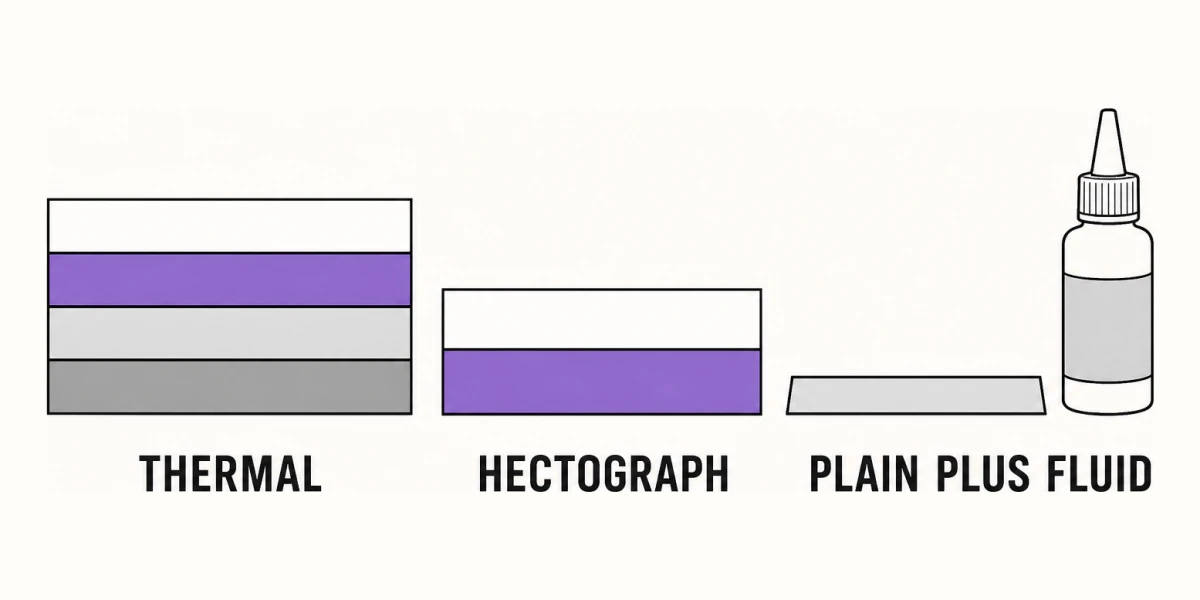
Stencil paper is the least glamorous purchase in tattooing and the one that decides whether your linework survives the trip from screen to skin. There are only three real categories, they cost wildly different amounts, and they fail in different ways. Here is what each one is, what it needs, and how to tell which one your design belongs on.
The three papers, compared
| Paper type | Thermal transfer paper | Hectograph / freehand carbon | Plain paper (+ carbon or fluid) |
|---|---|---|---|
| What it is | Four bonded layers: master sheet, tissue interleaf, purple carbon, backing | One sheet coated with purple hectograph ink, often sold as a pad with a white top sheet | Ordinary copy paper, 75–90 gsm, carrying ink or toner only |
| Equipment needed | A thermal copier, or a printer sold specifically for that paper type | A ballpoint pen or dead stylus, and a window or lightbox | A home printer, plus a carbon sheet or a transfer fluid |
| Typical cost | Roughly $0.15–$0.40 per sheet in 100-sheet packs; the machine is $150–$800 | Roughly $0.10–$0.25 per sheet; no machine | Under $0.02 per sheet; the printer you already own |
| Line fidelity | Holds roughly 0.3–0.5 mm lines and reproduces stipple and halftone as drawn | Realistically 1 mm and up, weight varies with hand pressure, stipple is not viable | Depends entirely on the second step; usually bold outlines only |
| Time per stencil | Seconds once the file is ready | 10–45 minutes of tracing for a mid-size piece | 10–45 minutes, same tracing work, one extra print |
| Right when | You have a finished digital file, fine detail, or a repeatable design | You are hand-drawing, traveling light, or working from a rough that will change | You are printing from a phone or laptop and will retrace, or testing placement |
The short version: thermal is the only route that reproduces a digital file honestly. Everything else asks your hand to redraw the design, which is fine for bold traditional linework and unworkable for dotwork, fine ornamental, or dense script. If the piece has stipple, hairlines, or lettering under about 8 mm tall, budget for thermal paper and a machine, or accept that you are redrawing it.
What the four layers of thermal transfer paper actually do
Open a fresh sheet and you are holding a stack, not a page. From the top down:
- The master sheet — thin, white, usually the smoothest layer. Your design ends up on its underside in purple wax, and this is the sheet that touches skin.
- The tissue interleaf — a milky or pale yellow onion-skin layer that keeps the carbon off the master in the pack. Pull it out and throw it away before you image the sheet. Leaving it in is the single most common reason a beginner’s thermal stencil comes out blank or ghosted.
- The carbon layer — the purple or violet wax that does the work. It is a donor, not a print. Heat melts it upward onto the back of the master wherever the design is dark.
- The backing sheet — stiffer, often yellow or brown. It protects the carbon in the box and separates cleanly once the sheet has been through the machine.
A thermal copier images the stack with a heated head, typically at 200–300 dpi. That number is the ceiling on your detail, and it is the reason a 300 dpi source file is worth preparing properly. It also explains two failure modes: heat is indiscriminate, so a sheet left on a dashboard or fed into a laser printer’s fuser will darken or melt across its whole surface, and a design with large solid black fills will lay down far more wax than you want, which then bleeds under a wet transfer gel.
There are also printer-specific stencil papers sold as inkjet or laser types. These are genuinely useful and genuinely narrow. Each pack works in exactly one printer family, the transfer is usually lighter than a thermal master, and the pigment sits on the surface rather than being melted onto it, so it is easier to smudge before it dries.
Hectograph and freehand carbon: the hand-traced route
Hectograph paper is what most people picture as “carbon paper.” A pad gives you a white sheet on top and a purple carbon sheet beneath it, carbon side facing up. You draw or trace on the white sheet, pressure deposits purple ink on its back, and the back is what you apply.
Its virtues are real. It costs almost nothing, needs no power, fits in a backpack, and survives a convention hall where an outlet is a negotiation. It is also the honest choice when the design is still moving: reworking a hectograph trace is a matter of a fresh sheet, not a fresh print run.
Its limits are equally real, and they are limits of your hand, not the paper. A ballpoint or a dead pen gives the crispest line, but line weight still tracks how hard you press, so a long steady curve tends to thin out at the end of a stroke. Anything below roughly 1 mm of separation between two lines closes up when the wax spreads. Stipple is out: 400 individually placed dots is not a tracing job. If you are hand-tracing, redraw the piece as clean single-weight outlines first rather than fighting the paper.
Plain paper, stencil fluid, and why it is not a shortcut
Plain copy paper carries no transferable pigment. That is worth stating plainly, because a lot of frustration starts with someone printing a design at home, pressing it to prepped skin, and getting nothing but a damp page.
The two things people actually mean by this route are different in reliability. The first is the reliable one: print or draw the design on plain paper, lay it over a hectograph sheet, and retrace the lines with a stylus. The print becomes a guide, and you end up with a real transfer sheet. You still do the tracing, but you are tracing something already sized and composed, which removes most of the drawing error.
The second is the improvised one: fresh laser toner or certain pigment inks offset onto skin that has been prepped with an alcohol-based transfer fluid or hand sanitizer. It sometimes works. It is blotchy, it drops thin lines first, and it gives you no second attempt once the sheet is wet. Treat it as a last resort at a convention rather than a method, and read transferring a stencil without a thermal printer before you rely on it for a paying client.
What a phone-printed design actually needs
A design prepared on a phone lands on plain paper, because that is what a home AirPrint printer holds. So the phone stage is about producing a file that is worth transferring, and the paper stage is a separate decision you still have to make.
That is where InkLine sits. It converts a photo to a stencil locally in six stencil modes: Linework for the solid black lines most stencils are made of, Outline for the bare contours that hand-tracing needs, Dotwork for stippled tone that only thermal paper can reproduce faithfully, and Tonal for a shadow map drawn in black lines and hatching rather than grey. Sketch is the one mode whose shading stays as grey tones, and grey is what every transfer paper handles worst, so treat that shading as reference rather than as something the sheet will carry. A line-weight setting can redraw the stencil for its print size at fine 0.3 mm, medium 0.4 mm or bold 0.5 mm, which is the range thermal paper holds cleanly.
Print layout covers five paper sizes — US Letter (215.9 × 279.4 mm), US Legal (215.9 × 355.6 mm), Tabloid (279.4 × 431.8 mm), A4 (210 × 297 mm) and A3 (297 × 420 mm) — in portrait or landscape, and tiles across up to 3 × 3 sheets when a design is larger than one page. Since thermal transfer paper is generally sold only in Letter and A4, tiling is usually how a back or thigh piece gets onto stencil paper at all.
Two honest limits belong here. Below roughly 1000 px on the long edge, a photo cannot be rescued into a clean stencil in any app; at that point you are redrawing, not converting, and hectograph paper is the more sensible destination. And InkLine does not replace a dedicated thermal stencil printer for shop-volume work: it prepares the file, the machine still makes the sheet.
Choosing, and what still goes wrong
Work backward from the design, not from the price list. Fine detail, stipple, small lettering, or a piece you will apply more than once means thermal paper and a machine. Bold outlines, a design still under discussion, or a setup with no power means hectograph. Plain paper means you have chosen to retrace, and you should plan the extra 20 minutes rather than discover it.
Then watch the two failures that are not about paper choice. Solid black fills lay down too much wax and bleed once transfer gel goes on, so convert large blacks to outlines or open hatching before printing. And lines that arrive on skin broken or dotted are usually a source-image problem rather than a paper problem, which is covered in why stencil lines break up. If the print itself is coming out wrong-sized or soft, start with printing a stencil at home, and use multi-page tiling for anything wider than a single sheet.
Frequently asked questions
Can I print on thermal stencil paper with a regular home printer?
Standard four-layer thermal transfer paper cannot be printed on an inkjet, and it should never go through a laser printer, where the fuser's heat melts the carbon layer inside the machine. Only packs explicitly sold as inkjet stencil paper or laser stencil paper are safe in those printers, and each type works in one printer family, not both.
What is the difference between thermal and hectograph stencil paper?
Thermal transfer paper is a bonded stack of four layers that a heated machine images in a few seconds, so it copies exactly what is in the file. Hectograph paper is a single purple carbon sheet that only transfers where a stylus presses on it, so the design comes from your hand rather than from a printer.
Which side of a stencil sheet goes against the skin?
The purple side. On a thermal sheet that is the underside of the white top layer after the carbon has been transferred to it; on a hectograph pad it is the back of the sheet you drew on. Both give you a mirrored image on the paper that reads correctly once it is on skin.
Do I need stencil paper if I designed the tattoo on my phone?
Yes. A phone can prepare and print the artwork, but paper is what carries pigment to skin. In InkLine the manual workflow of processing, editing, print layout and export is free up to an allowance on how many images you carry through it and needs a subscription past that allowance, and AI generation runs on a credit system, but every route still ends at a thermal sheet, a hectograph sheet, or a hand-traced transfer.