
How to Make a Tattoo Stencil in Photoshop (Print-Ready Steps)
Direct answer
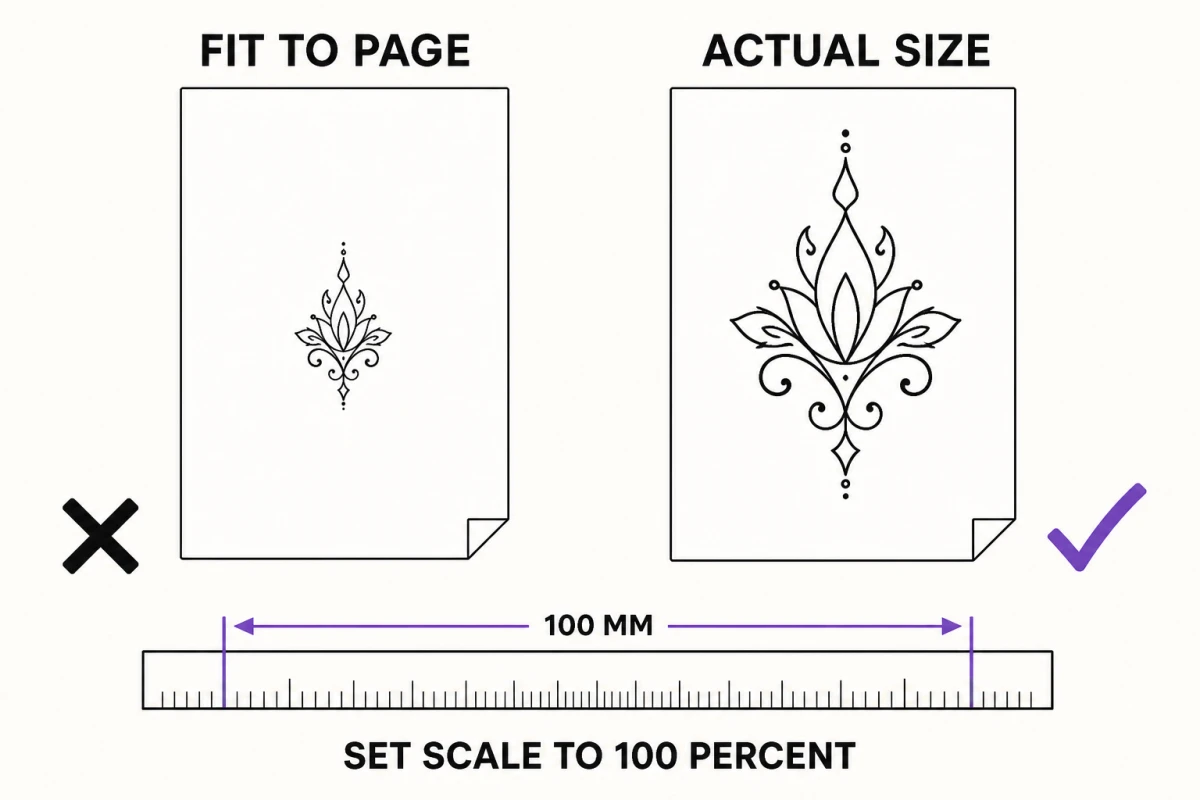
How to make a tattoo stencil in Photoshop: set Image Size to the tattoo's finished width at 300 ppi, desaturate and push contrast with Levels or Curves, use Threshold or Find Edges only as a rough guide, then trace the lines you keep on a new layer with the Pen tool or a hard brush. Delete every grey pixel so only black lines on white remain, and print at 100 percent with "Scale to Fit Media" turned off, then measure the print with a ruler. GIMP does the same job with Colors > Threshold and Filters > Edge-Detect.
Photoshop can make an excellent tattoo stencil, but not with a single filter. The reliable method is to size the file correctly first, use Photoshop’s tone tools to make the lines easy to see, and then trace the lines you actually intend to tattoo on their own layer. The filters give you a map; you still draw the route. Here is the order that works, the settings that matter, and an honest look at when an iPhone or iPad app is faster.
The Photoshop stencil workflow, in order
- Size the document to the tattoo. Image > Image Size, with Resample unticked, width set to the finished tattoo width, resolution at 300 pixels per inch.
- Desaturate. Image > Adjustments > Desaturate, or a Black & White adjustment layer when you need to control how specific colors convert.
- Raise contrast. Levels or Curves, until the edges you care about separate clearly.
- Generate a rough guide. Filter > Stylize > Find Edges or Image > Adjustments > Threshold on a duplicate layer, at reduced opacity.
- Trace on a new layer. Pen tool with Stroke Path, or a hard round brush. Only the lines you will tattoo.
- Delete the grey. Final Threshold over the tracing so every pixel is black or white, then clean up at 100 percent zoom.
- Print at 100 percent. Untick Scale to Fit Media, print, and measure with a ruler.
Steps 1 and 7 decide whether the stencil fits the client. Steps 5 and 6 decide whether it transfers cleanly. The rest is preparation.
Set Image Size before anything else
Open Image > Image Size and untick Resample first. With resampling off, the pixel count is locked, so changing the width to the tattoo’s real size changes only the resolution field. That number tells you the truth about your source: at 300 pixels per inch, a 10 cm (about 4 in) design needs roughly 1200 px across the part you are keeping, and a 20 cm (8 in) forearm piece needs about 2400 px. If the resolution drops to 120 or 150, the photo does not hold enough detail for that size.
Only then decide whether to resample. Ticking Resample and setting 300 ppi lets Photoshop add pixels — Preserve Details 2.0 does a decent job of keeping edges crisp — but it cannot add information the camera never captured. Upscaling makes lines print more smoothly; it does not make a blurry eye sharp. Below roughly 1000 px on the long edge you are redrawing from reference, not converting. Photo resolution for tattoo stencils walks through checking a source before you promise a client a size.
Crop at this stage too. Background the tattoo will never include only skews the tone adjustments that follow and gives the edge filters more noise to find.
Desaturate and push contrast
Image > Adjustments > Desaturate is the quick route. A Black & White adjustment layer is better when the photo has colors of similar brightness — a red flower against green leaves can collapse into one flat grey under Desaturate, and the Black & White sliders let you pull those two colors apart before the edge disappears.
Then shape the tones. In Levels, drag the black input slider right and the white input slider left until shadows go deep and highlights go clean. In Curves, a gentle S-shape does the same thing with more control over the midtones, which is where facial features and fabric folds live. The goal is not an attractive image. The goal is an image where you can see, at a glance, exactly where each line you plan to tattoo begins and ends.
Filters are a guide, tracing is the stencil
Duplicate the adjusted layer and try two things. Filter > Stylize > Find Edges outlines every tonal transition it finds; after desaturation it gives grey contour lines on white, useful for linework and lettering-adjacent shapes. Image > Adjustments > Threshold splits the image at a single brightness value into pure black and pure white, which shows shadow shapes for blackwork or realism planning. Neither is a stencil. Find Edges traces texture, noise and JPEG blocks with the same enthusiasm as the jawline you care about, and Threshold fills shadows into solid black blobs that will not transfer cleanly.
So lower the guide layer to around 30 to 50 percent opacity and add a new empty layer above it. On that layer, draw only what you will tattoo:
- Pen tool and Stroke Path for smooth, deliberate curves. Draw the path, set your brush size, then right-click the path in the Paths panel and choose Stroke Path with the Brush. This is the cleanest route for ornamental, script-adjacent and geometric work.
- A hard round brush at 100 percent hardness for organic shapes, with a drawing tablet if you have one. Use pressure sparingly; a stencil line is a guide for the needle, and an even weight transfers more predictably than tapered strokes.
Keep the line weight consistent with the print size. A line that looks right zoomed out on a 27-inch monitor can print as a hair on paper. When you are done, hide everything except the tracing, put a white fill layer under it, and add a final Threshold adjustment on top. Anti-aliased edges and any soft-brush strokes leave grey pixels, and grey prints pale and transfers faint or not at all. Threshold forces each pixel to black or white. Zoom to 100 percent and hunt for gaps, doubled lines and stray dots, because each one becomes a real mark on skin.
Print at true size and check with a ruler
In File > Print, look at the Position and Size section. Untick Scale to Fit Media so the scale reads 100 percent and the printed width matches what you set in Image Size. Then check the printer driver’s own settings: some drivers add a fit-to-page or borderless expansion on top of Photoshop’s setting. Print one copy on plain paper, measure the design with a ruler, and only then print onto stencil transfer paper. A 5 percent shrink on a 20 cm design is a full centimeter, and it shows up only once the stencil is on the client. How to print a tattoo stencil at home covers paper handling and driver settings in more detail.
A design larger than one sheet needs splitting by hand in Photoshop — duplicate the file, crop each section with an overlap, and add your own alignment marks. That is doable but fiddly, and it is where most home-printed large stencils go wrong.
GIMP, the free desktop equivalent
Everything above works in GIMP with different menu names. Image > Scale Image and Image > Print Size set the pixel dimensions and the resolution. Colors > Desaturate removes color, and Colors > Levels and Colors > Curves shape tone. Colors > Threshold gives the same hard black-and-white split, and Filters > Edge-Detect offers several edge filters to build a tracing guide. Trace on a new layer with the Paths tool and Edit > Stroke Path, or a hard-edged brush. The workflow, the 300 ppi rule and the print-at-100-percent check are identical.
When Photoshop is the better tool, and when an app is faster
Be honest about the time. Done properly, a Photoshop stencil from a photo takes anywhere from 20 minutes for a simple outline to a couple of hours for a detailed piece, most of it in tracing and cleanup. That time buys full control, and for some jobs nothing else comes close. Photoshop is the better tool for heavy compositing — combining several references into one design, rebuilding a background, blending elements from different photos — and for precise lettering, where you set type in a licensed font, convert it to shapes and adjust every curve by hand.
For the everyday job of turning one photo or sketch into a printable stencil, an app on the device you already hold is quicker. InkLine runs on iPhone and iPad and converts a photo locally in six stencil modes — Linework, Sketch, Outline, Dotwork, Tonal and Denoised — each of which decides differently what becomes a line, so you are choosing a construction method rather than tuning one filter. The six extraction modes explains what each produces. You type the stencil’s width or height in centimeters or inches, and the layout puts the lines at that size on US Letter, US Legal, Tabloid, A4 or A3, with a 5 cm (2 in) check ruler on every sheet; designs larger than one page tile across up to 3 × 3 sheets with overlap, registration marks and labels. On iPad you can redraw lines with an Apple Pencil against the original photo set underneath the stencil.
What it does not do: InkLine has no layers to composite several images and no type tool, so the jobs above stay in Photoshop. It also cannot rescue a source below roughly 1000 px on its long edge, and it does not replace a thermal stencil printer for shop-volume work. InkLine is a free download; the manual stencil workflow is free up to an allowance on how many images you carry through it and needs a subscription past that, and AI generation uses credits. Many artists use both: composite and letter in Photoshop, export a flat PNG, then convert, size and tile it on the iPad.
Frequently asked questions
What resolution should a tattoo stencil be in Photoshop?
Set it to 300 pixels per inch at the tattoo's finished size. A 10 cm (about 4 in) wide design needs roughly 1200 px across at that density; if Image Size shows far less with Resample off, the photo will need redrawing rather than converting.
Is there a stencil filter in Photoshop?
Not a dedicated one. Threshold, Find Edges and Filter Gallery effects such as Photocopy produce stencil-like images, but each leaves noise, broken lines or grey that needs cleanup, so treat them as a guide to trace over rather than a finished stencil.
Why does my Photoshop stencil print the wrong size?
Usually Scale to Fit Media in Photoshop's Print dialog, or a fit-to-page option in the printer driver, is shrinking the page. Turn both off, confirm the scale reads 100 percent, and measure the print before transfer.
Can I make a tattoo stencil in GIMP instead of Photoshop?
Yes. Image > Scale Image and Image > Print Size set the dimensions, Colors > Desaturate and Colors > Levels handle tone, Colors > Threshold gives the hard black-and-white split, and Filters > Edge-Detect offers edge filters to trace over.
Should the stencil be mirrored before printing?
For a thermal printer or hectograph paper, print the design the right way round: the carbon sheet transfers a reversed copy to the back of the top sheet, which reads correctly once applied to skin. Check your transfer paper's instructions if you are unsure.