
Freehand on skin
Freehand Tattoo Stencil Tracing on Skin: The Overlay Workflow
Direct answer
Freehand tattoo stencil tracing on skin means drawing the design directly with a skin-safe marker while the reference stays on a screen beside you — it is never projected onto the body. Lay the design at roughly 30 to 50 percent opacity over a photo of the placement, mark three to five anchor landmarks before any linework, and verify proportion by photographing the drawn-on skin and comparing it against the design. Freehand wins on flowing work that follows anatomy and loses on lettering, mandalas, and anything mirrored. InkLine builds the design and exports its lines as a transparent PNG to lay over that photo; the lines on skin are still entirely your hand.
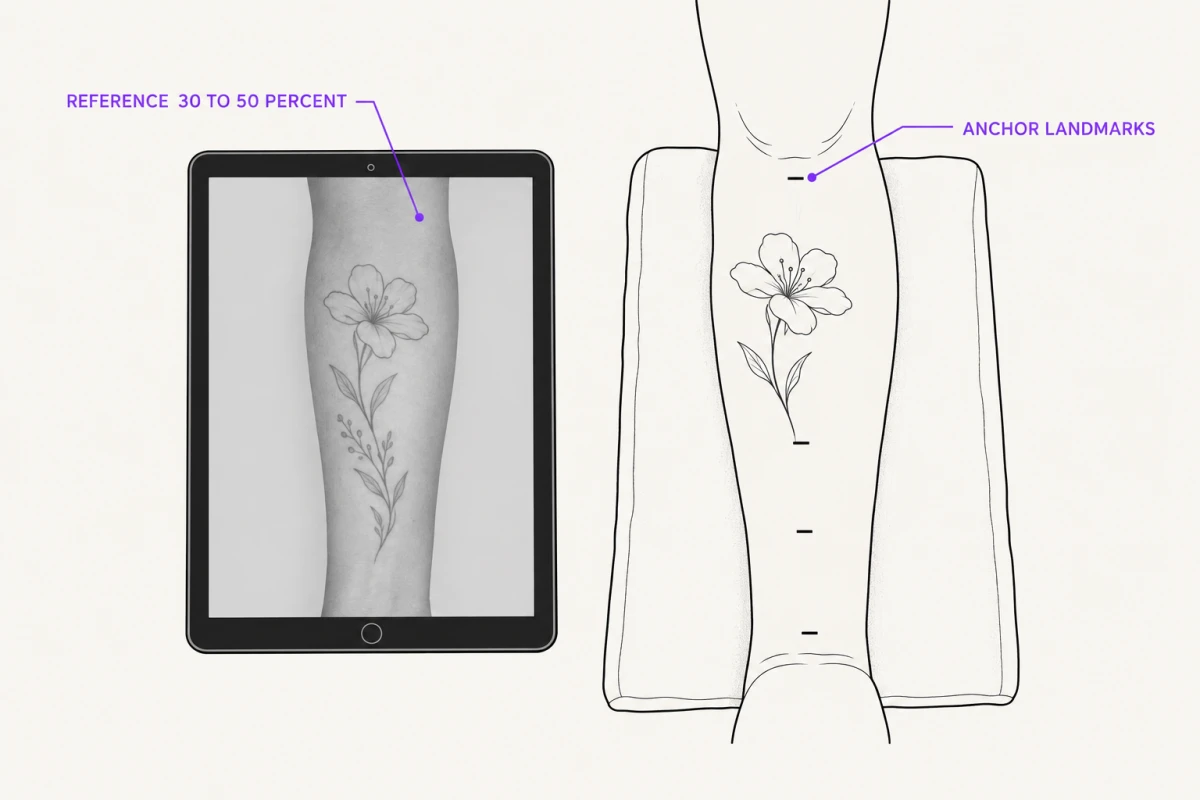
Plenty of artists draw straight onto skin with a marker and never touch a transfer sheet. The reference still has to live somewhere, and a tablet propped at working height beats a printout taped to a mirror. What follows is how the reference-overlay workflow actually runs, where freehand produces a genuinely better tattoo than a transferred stencil, and where it quietly produces a worse one.
The reference-overlay freehand loop, step by step
The mistake most people make is treating the overlay as a one-time setup: load the reference, glance at it, draw. The value is in the loop — draw a little, photograph, compare at opacity, correct on skin, repeat.
1. Photograph the placement in the session position. Not the client standing relaxed if they will be lying on their side with the arm forward. Ribs, inner bicep, and the back of a shoulder can shift several centimeters between poses, and a design fitted to the wrong pose fits nothing. Hold the camera parallel to the surface, square-on, from roughly a meter back rather than close and wide — a phone lens at 20 cm exaggerates whatever is nearest to it, and that distortion carries into every comparison you make later.
2. Put the design over that photo. Export the stencil from InkLine as a PNG with a transparent background — lines only, the option exists for Procreate and mockups — and drop it on a layer above the placement photo in a layering app such as Procreate, with the layer opacity down around 30 to 50 percent so you can read both at once. You are not deciding line detail here. You are deciding size, rotation, where the piece crosses a bone or a muscle boundary, and where it breaks. Keep the opacity moving so you can flick between reading the body and reading the design. InkLine’s own photo guide works the other way round: on the Edit screen it puts the photo the stencil was made from under the stencil, which is for fixing lines, not for fitting a design to a body.
3. Rebuild anything that does not fit. This is where an iPad earns its place over a printout. If the design’s lower third collides with the elbow crease, redraw the lower third in InkLine with Apple Pencil instead of arguing with the file, then export it again. Pen for contour you have committed to, Pencil for exploratory strokes, Marker for weight — with stroke-by-stroke undo, and every earlier step still on the timeline, so backing out a bad flow decision costs little.
4. Mark anchors on skin before any linework. Three to five points: the top of the piece, the bottom, the widest crossing, and wherever it passes over bone. Measure those against the design file with a flexible tailor’s tape, not a rigid ruler, because a rigid ruler measures the chord and the tattoo follows the arc. Getting anchors right takes two minutes and prevents the failure where a design drifts a centimeter lower with every element you add.
5. Draw the piece with the tablet in a fixed position. Prop it at a consistent distance and angle in your peripheral vision. If the tablet moves between glances, apparent proportion moves with it, and you will chase a shape that was never wrong.
6. Photograph the drawn-on skin and put it back under the design. Swap the marker photo in under the same transparent stencil layer and raise the layer to 80 to 90 percent opacity. A 4 mm proportion error is invisible to your eyes at 30 cm and obvious at 100 percent zoom on a screen. Correct on skin, re-shoot, repeat until it holds. Two or three passes is normal for a mid-size piece.
That loop is the whole method. Everything else on this page is judgment about when to run it and when to print instead.
When freehand beats a transferred stencil
Work that follows anatomy. A stencil is printed flat and applied to a curve. Along the axis of that curve, a design loses effective length — a 20 cm band that measures 20 cm on paper reads short and pinched once it wraps a bicep. Drawing on skin means the design is made at the curve’s true length from the start.
Position-dependent placements. Ribs, inner arm, side of the neck, back of the knee. These move enough between poses that a stencil applied in one position sits wrong in the other. Freehand lets you draw in the session position and adjust as the client settles.
Filler, background, and gap work. Smoke, waves, foliage, and blackwork negative space between existing tattoos have no correct file, because the design is defined by the gaps. Trying to author that in advance and transfer it is slower and worse than drawing it in place.
Tapering limbs. An ornamental band transferred straight onto a forearm that narrows toward the wrist visibly widens as it descends. Freehand tracks the taper.
Around scars, moles, and existing work. You can see and route around what is actually there.
Be honest about the trade. Freehand is not a shortcut around drawing ability — it demands drawing on a curved, mobile, sweating surface with no undo, under a client’s gaze, on a clock. It is a different skill, not a lesser one, and it takes real practice to reach the point where it beats a clean transfer.
When freehand loses, reliably
Symmetry. Mandalas, sternum pieces, matched spine work, anything mirrored. Human perception is unusually sensitive to bilateral asymmetry; a design three degrees out of true reads as wrong to people who cannot articulate why. Freehanding true symmetry across a curved surface is hard enough that it is not worth the risk on a paying client.
Lettering and script. Letterforms are fixed, and the eye compares them against every letter it has ever read. A 2 mm baseline drift across a 15 cm word is visible in every photograph of that tattoo forever. Hand-kerning under session pressure fails.
Repeated geometry. Scale patterns, dot grids, tessellation, evenly spaced ornament. Spacing errors do not average out; they accumulate, and by the eighth repeat the drift is structural.
Anything the client already approved as a specific image. If they signed off on a drawing, they are expecting that drawing, not your on-skin interpretation of it. That is a consent issue before it is a craft one.
For all of these, lay the design out at final size and transfer it. You do not need a thermal machine to do that well — the hectograph tracing method in transferring a stencil without a thermal printer covers the whole route, including the failure modes.
Checking symmetry and size without a projector
This is the constraint worth repeating: an on-screen overlay does not put a line on skin. InkLine is a drawing and layout tool, not a projector — the screen sits beside the body. Nothing about adjustable opacity changes that, and any workflow that quietly assumes otherwise will produce a lopsided mandala.
What actually works:
| Check | Tool | What it catches |
|---|---|---|
| Left/right distance from centerline | Dividers or calipers | Mirrored elements landing at different radii |
| True length over a curve | Flexible tailor’s tape | Designs that measure right flat and read short on skin |
| Overall balance in position | Mirror, client in session pose | Rotation and tilt you cannot see up close |
| Fine proportion drift | Square-on photo at 80–90% overlay opacity | Errors under about 5 mm |
| Absolute symmetry | Printed centerline or skeleton, transferred | Everything the eye lets through |
The mirror-and-flip route is worth knowing: photograph the marked skin square-on, mirror the photo, and lay it over the original at 50 percent opacity. A symmetric drawing will nearly overlap itself. An asymmetric one splits apart in a way no amount of squinting at the client would have revealed.
The hybrid most working artists actually use
Transfer the skeleton; freehand the flesh.
Print and transfer only the parts that must be exact — the centerline, the outer envelope of the piece, any lettering, and the symmetric core of an ornamental design. Registration marks at the anchor points help. Then draw everything organic on top of that framework by hand, in position, with the reference on screen.
This gets you the accuracy of a stencil where accuracy matters and the anatomical fit of freehand where fit matters, and it cuts transfer time substantially because you are only transferring a fraction of the linework. It also survives the common failure where a full stencil smudges during a long session: a centerline and four registration marks are trivial to redraw, a full mandala is not.
A note on cost, since it decides whether this workflow is available to you at all: InkLine is a free download, and the manual side — processing a reference, drawing over it with Apple Pencil, laying out a print, exporting a PDF — is free up to an allowance on how many images you carry through it, and past that allowance it needs a subscription. A freehand job leans on one reference image and a lot of hand drawing over it, so it sits at the light end of that allowance; a day of processing client photo after client photo does not. AI generation runs on a credit system and needs a network connection, so plan around it rather than depending on it in a room with no signal.
Practical failures worth pre-empting
Screen glare. A glossy tablet under an angled shop lamp is unreadable at exactly the angle you want to work from. Move the lamp or fit a matte film before the client is in the chair, not during.
Perspective error in your own reference photos. Every comparison you make is only as good as the photo underneath it. Shoot square-on, from a distance, and re-shoot rather than mentally correcting for a tilted frame.
Marker removal. Stencil fluid, green soap, and alcohol all lift marker to some degree. Re-check the drawing immediately before the first line, not twenty minutes earlier.
Source detail that was never there. If you are pulling linework from a low-resolution reference, the overlay will not save it. Below roughly 1000 px on the long edge, you are redrawing the design, not converting it — which on a freehand job is fine, as long as you know that is what you signed up for and priced the drawing time accordingly.
Overworking the skin. Repeated draw-wipe-redraw cycles irritate the area you are about to tattoo. Two correction passes is a workflow; six is a sign the design should have been transferred.
What this cannot fix
- An on-screen overlay is a drawing aid, not a projector. Nothing the app displays lands on skin — every line still comes out of your hand and your marker.
- Symmetry cannot be confirmed from a flat screen held next to a curved body. Mirrored pieces still need calipers, a flexible tape, or a printed centerline guide transferred to skin.
- The on-skin preview is an AI-generated image of the design on a generic body part, not a photo of your client and not a measurement of how a design sits on a curved surface. It will not tell you a shoulder wrap runs 8 mm short around the deltoid.
- InkLine does not lay the design over a photo of the placement. Its photo guide shows the photo the stencil was made from, under the stencil, for fixing lines. For the placement comparison, export the stencil as a PNG with a transparent background and layer it over the placement photo in an app that does layers.
- AI generation needs a network connection. In a basement studio or a convention hall with no usable signal, you have the local manual tools — processing, drawing, print layout — and nothing else.
Frequently asked questions
Can a tablet project the design onto the skin?
No. A reference overlay lives on the tablet screen next to the body, not on the body. The only equipment that puts an image on skin is an optical or laser projector aimed at the client, and even those need the limb held still in one position. Treat the screen as a reference you glance at, the same way you would a printout taped to the wall — just adjustable, zoomable, and able to sit at any opacity over a photo of the actual placement.
What opacity should the reference overlay sit at?
Around 30 to 50 percent for drawing over a photo of the placement, so you can read the body underneath and the design at the same time. Push it to 80 or 90 percent when you are checking your on-skin marker work against the design, because at that point you want the discrepancies loud rather than subtle. There is no single correct number; the useful habit is changing it deliberately at each stage instead of leaving it wherever it landed.
Is freehand actually better than a stencil for ribs and other curved placements?
Often, yes. A stencil is printed flat and applied to a curved, mobile surface, so it loses length along the axis of the curve and shifts when the client changes position. Ribs move several centimeters between standing and lying down. Drawing in the position the client will hold for the session sidesteps that entirely. The trade is that you need to draw well on a surface that flexes and sweats, with no undo.
How do I check that a freehand mandala is symmetrical without a stencil?
Draw the centerline on skin first and check it in the tattooing position, then set a pair of dividers or calipers to the distance from that centerline to a feature on one side and step it across to the other. Photograph the marked skin square-on from about a meter back, then compare that photo against a mirrored copy of itself at 50 percent opacity — a mandala that is a few degrees out will jump apart immediately.
What can I draw on skin with?
Use markers sold as skin-safe surgical or tattoo markers, in violet or a color you can still see once the area is stretched and wiped. Do not reach for a whiteboard marker, a permanent marker, or anything not intended for skin contact. Wipe a small test area first if the client has known sensitivities, and remember that stencil fluid, green soap, and alcohol will all lift marker lines to some degree, so re-check the drawing right before you start.