
vs Tattoo AI – Tattoo Design
Tattoo AI vs Tattoo Stencil App: What Each One Is For
Direct answer
Tattoo AI vs tattoo stencil app is a comparison of two different jobs rather than two versions of the same one. Tattoo AI, from HUBX, holds 4.55 stars across 50,946 US ratings as of September 2026 and exists to generate original designs from a text prompt, which makes it the deeper library for ideas. A stencil app's work starts after the design exists: extracting clean linework, laying it out at a measured size on paper such as US Letter, A4 or A3, tiling it across sheets when it is larger than one page, and printing it. InkLine is built for that second half.
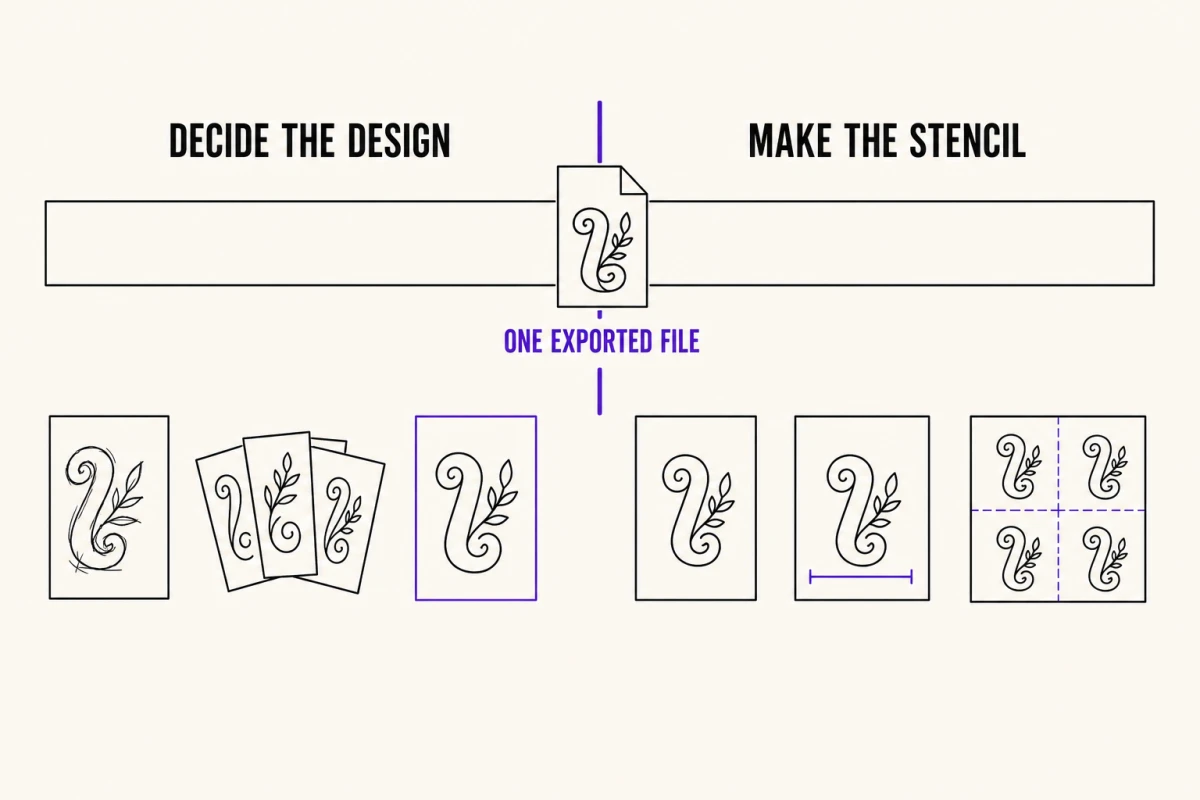
Tattoo AI is the biggest app in this corner of the App Store, and most comparisons against it are dishonest in the same way: they pretend it is a worse version of a stencil tool. It is not. It is a very successful design generator, and if you searched for it because you want tattoo ideas, it is probably the right download. The useful question is narrower — which half of the work are you actually stuck on.
Start here: which half of the job are you stuck on
Making a tattoo happen splits cleanly into two stages. Stage one is deciding what the design is. Stage two is turning that decision into a physical stencil at a measured size on the client’s skin. Almost every app in this category is strong at exactly one of them, and the fastest way to pick is to name the thing blocking you right now.
| What you are trying to do | The tool that fits | Why |
|---|---|---|
| Find a concept you have not drawn yet | A design generator like Tattoo AI | The largest library and the cheapest iteration — run twenty prompts, keep one |
| Show a client roughly how an idea sits on an arm | Either; both offer on-skin visualization | It is a mockup for the conversation, not a fitting |
| Convert a client’s own photo into clean linework | A stencil app with extraction controls | You need denoise, outline and cleanup as separate dials, not a new image |
| Print at exactly 14 cm (5.5 in) tall on A4 | A stencil app with a print layout step | Size lives in the page layout, never in the image file |
| Print a back piece across four sheets | A stencil app with multi-page tiling | AirPrint has no poster or tiling mode of its own |
| Redraw over a reference by hand | A stencil app with a pencil and an overlay | Generators produce pictures; they do not ship brush editors |
If your answer sits in the top two rows, install Tattoo AI and stop reading. If it sits in the bottom four, a generator will not get you there no matter how good its output looks on screen, and that is the whole argument of this page.
What Tattoo AI is genuinely better at
Credit where it is earned. Tattoo AI, published by HUBX, has been on the store since June 2024 and carries 4.55 stars across 50,946 US ratings as of September 2026 — a rating base roughly a hundred times larger than anything a stencil-first app in this niche has accumulated. Volume like that is not nothing. It means the generation pipeline has been exercised across an enormous number of prompts, and the styles that come back have been shaped by that feedback.
Its App Store listing describes a prompt-to-design generator, a wide spread of styles from black-and-gray through Japanese and tribal work, text-based designs with selectable fonts, and visualization of a design on different body parts. For someone who is not an artist — the client who wants to walk into a shop with a picture and a size in mind — that is the complete toolkit. The artist will draw the stencil. The client only needs to arrive with a clear idea, and a large generator is the best way to arrive with one.
It is also honest to say that a dedicated generator will usually beat a generator bolted onto a production app on variety alone. That is a resourcing fact, not a marketing one.
Where a generated image stops and a stencil begins
An image is not a stencil. Three things have to be true of a stencil that are not true of a picture on a screen, and none of them are solved by better generation.
It has a physical size. A stencil is measured in centimeters of skin, and the arithmetic runs at about 300 pixels per printed inch. A 14 cm (5.5 in) design therefore wants roughly 1,650 px on that edge to print without visible softening. Whatever generator you use, check the pixel dimensions of what it actually exports — a square image that looks crisp at phone size can be well under what a forearm piece needs. Below roughly 1,000 px on the long edge, no processing rescues a file into clean linework; you are redrawing, not converting. The photo resolution guide works through the numbers.
Its lines have to survive skin. Transfer-ready linework needs closed contours, spacing wide enough to allow for ink spread, and no gray mush where a shadow used to be. That is what stencil modes are for. Linework traces solid lines and keeps the true blacks; Denoised does the same on a noise-reduced copy when the file is grainy; Outline strips it to bare contours; Tonal turns shading into a shadow map instead of gray; Cleanup removes speckle but starts eating fine detail if you push it. Those are separate decisions, and a generator does not expose them because it was never asked to.
It has to land on a page. Paper size, orientation, margins, and — for anything bigger than one sheet — multi-page tiling with edges that reassemble. iOS gives you no scaling slider in its print sheet, which means the file has to already be laid out on the paper before it leaves the app; InkLine does that layout in its own print screen for exactly this reason, and prints a 5 cm check ruler on every sheet so you can prove the scale with a real ruler. The home printing guide covers the print dialog itself, which is where most wrong-size stencils are actually created.
That third point is where most of the 1-star reviews in this whole category come from. A design that is beautiful on screen and 30 percent too small on paper is a wasted appointment.
Money, stated plainly on both sides
Both apps are free to download, and both make money after that, so the honest comparison is about when each one asks and for what.
Tattoo AI’s US App Store listing, checked September 2026, shows auto-renewing subscriptions priced from $6.99 to $9.99 per week and from $29.99 to $39.99 per year. Several different price points appear at once, which normally means the paywall is being tested across install cohorts — so the offer you see may genuinely differ from the one a friend sees, and the annual figure is the one worth comparing rather than the weekly.
InkLine is free to download, and the manual stencil workflow — processing, editing, print layout and export — is free up to an allowance on how many images you carry through it. Past that allowance it takes a subscription, and the tier that covers manual editing is sold separately from AI credits, so an artist who never generates is not paying for generation. Those allowances are configured remotely per install and can change without an app update, which is why this site never quotes a number for them — and the image count is held outside the app’s own storage, so deleting and reinstalling does not hand you a fresh one. Treat the allowance as a runway for evaluating the app, not as a permanent free tier.
Whichever you install, do the same test before you rely on either for a booked session: take one design all the way through to a sheet of paper, and find out where the app stops you. Ten minutes of that is worth more than any comparison table, including the one above.
Using both, which is what most artists end up doing
The two-app workflow is not a compromise; it is the normal shape of the job. Generate the concept wherever the library is deepest. Export the highest-resolution file that app will give you. Bring it into the stencil app and start with Linework, since generated art is usually clean enough that Denoised is not needed, or Outline if you only want the bare contours; then repair the breaks by hand with an Apple Pencil rather than fighting the sliders for them. Lay it out at the true size the client agreed to, tile it if it exceeds one sheet, print, transfer.
InkLine does include its own generator: text prompt to design or stencil in 16 styles, photo to stencil, stencil to color, and an on-skin render at one of 10 placements. It is credit-based, and it needs a network connection because the processing pipeline is the only part that runs locally. The AI design generator page explains what it does. It is not going to out-range a generator with 50,000 ratings behind it, and pretending otherwise would be the kind of claim this site exists not to make. It is there so you do not have to leave the app for a quick concept, not so you never open a dedicated generator again.
What neither app fixes
Some limits belong to the medium, not the software, and both apps inherit them equally.
Neither replaces a dedicated thermal stencil printer for shop-volume work. Printing over AirPrint onto transfer paper is genuinely fine for a few stencils a day; it is not a substitute for purpose-built hardware when you are running back-to-back appointments.
An on-skin preview in either app is a visualization, not a measurement. InkLine’s is an AI-generated image of the design on a generic body part rather than on the client, and it cannot tell you how the piece will wrap a deltoid or foreshorten across ribs. That still comes from placing the paper on the actual limb and looking.
Neither app tells you whether the reference your client screenshotted is another artist’s copyrighted work. That judgment is yours, and it usually resolves to drawing the concept in your own hand rather than converting the file.
And neither one applies the stencil. A sheet that prints at exactly the right size still has to be positioned, transferred and given time to set, and more sessions go sideways at that step than at any point covered on this page.
InkLine vs Tattoo AI – Tattoo Design, feature by feature
What Tattoo AI – Tattoo Design does better: Tattoo AI is the category giant for idea generation: 50,946 US ratings at 4.55 stars as of September 2026, on the market since June 2024, with a design library and prompt-to-image workflow far broader than any stencil-first app ships. If what you need is options, it will give you more of them, faster.
| Feature | InkLine | Tattoo AI – Tattoo Design |
|---|---|---|
| The job it is built around | Turning one specific design into a printed, true-size, transfer-ready stencil. | Generating original tattoo designs from a text prompt, across a broad style library. |
| Track record | v1.1.0, iPhone and iPad on iOS 17 or later (App Store ID 6759935181). This page states the version rather than a release date or a rating figure — both move without a site edit, so judge it on the feature list and read the numbers off the listing. | Released June 2024, v1.7.7. 4.55 stars from 50,946 US ratings as of September 2026. |
| Your own photo to linework | Six stencil modes — Linework, Sketch, Outline, Dotwork, Tonal, Denoised — with Detail, Intensity and Cleanup sliders. | The listing advertises stencils made from designs it generates; it does not describe adjustable extraction controls for a photo you supply (checked Sept 2026). |
| Print layout | US Letter, US Legal, Tabloid, A4 or A3, portrait or landscape, laid out at the width or height you type before the file leaves the app, with a 5 cm check ruler on every sheet. | The App Store listing names no paper sizes and no print layout step (checked Sept 2026). |
| Designs larger than one sheet | Tiling up to 3 × 3 sheets, with registration marks, a dashed cut line and a label on every sheet, so a back or thigh piece prints across several sheets and reassembles. | No tiling described in the listing (checked Sept 2026). |
| Editing the lines by hand | Apple Pencil support, Pen/Pencil/Marker/Eraser with pressure or even width, mirror and flip, the original photo under the stencil as a tracing guide, stroke undo and a step timeline. | The listing describes saving and sharing designs, not a brush-level editor (checked Sept 2026). |
| Works without a connection | Stencil processing, editing, layout and export run on the device. AI generation needs a network. | Generation is a cloud feature and needs a network connection. |
| What it costs | Free download. The manual stencil workflow — processing, editing, layout, export — is free up to an allowance on the images you carry through it, and takes a subscription past it; manual editing is sold as its own tier, and AI generation uses credits. | Free download. The App Store lists auto-renewing weekly plans at $6.99–$9.99 and yearly plans at $29.99–$39.99 (US storefront, Sept 2026). |
| Languages in the listing | Eight: EN, FR, DE, IT, JA, KO, PT, ES. | English only, per the App Store metadata (checked Sept 2026). |
| On-skin preview | Yes — an AI-generated image of the design on a generic body part, at one of 10 placements on a male or female body; not a photo of you, and not a measurement of how it sits on a curved limb. | Body-part visualization is one of the listing's headline features. |
Competitor details are from the App Store listing as of September 2026 and change without notice. Check the current listing before deciding.
Frequently asked questions
Is Tattoo AI good for tattoo artists?
It is good for the part of the work that happens before drawing: pulling a wide spread of concepts fast, showing a client three directions instead of describing them, and breaking a blank-page stall. It is built as a design generator, so the production steps an artist still needs — measured print size, paper layout, tiling, hand repair of linework — are not what its App Store listing describes.
Can Tattoo AI print a stencil at the right size?
Its listing advertises stencil output but names no paper sizes and no print layout step as of September 2026, so treat print size as unverified until you test it. Size is a property of the exported file and the print dialog, not of the image itself — whichever app you use, measure the first printed sheet with a ruler before you trust it.
Do I need both an AI tattoo app and a stencil app?
Many artists end up with both, because they solve different halves. A generator gives you a concept; a stencil app turns that concept into a sheet you can transfer at the exact size the client agreed to. If you only ever tattoo your own drawings, you need the stencil half and can skip the generator entirely.
How much does Tattoo AI cost?
The download is free. As of September 2026 the US App Store listing shows auto-renewing subscriptions at $6.99 to $9.99 per week and $29.99 to $39.99 per year, with several price points listed at once — a sign the paywall is being tested, so the offer you see may not match the offer someone else sees. Check the live listing before you commit.
Which is better for turning a client's photo into a stencil?
A stencil-first app, because that path needs controls a generator does not expose: denoising before extraction, an outline pass you can dial in, and cleanup you can back off when it starts eating detail. A generator asked to redraw a photo returns a new image in its own style, which is a different and sometimes unwelcome result.