
How to Preview a Tattoo on Skin Before Getting It, by Placement
Direct answer
To preview a tattoo on skin before getting it, render the design at the specific body placement you are considering, then judge that render at the distance and angle people will really see it from — straight-on for an inner forearm, oblique and foreshortened for ribs. A preview settles composition, orientation and rough scale against the limb. It does not measure how the design sits on a curved surface, so the deciding check is still a printed true-size stencil held against the body. InkLine's preview is an AI-generated image of your design on a generic body part, at one of 10 placements on a male or female body, not a photo of you.
A design can look finished on a screen and still be wrong on a body, usually for one of three reasons: it is the wrong size for that limb, it crosses a curve that hides part of it, or it was composed to be viewed straight-on when nobody will ever see it that way. An on-skin preview exists to catch those three before a needle does. It is worth being precise about which questions it closes and which it only pretends to.
What the preview settles, and what it hands back to you
Treat the render as a composition tool with a narrow job description. It is genuinely good at a handful of decisions and structurally incapable of a few others, and separating the two is the difference between a useful preview and a false sense of certainty.
| Decision you are making | On-skin preview | Printed true-size stencil on the body |
|---|---|---|
| Does the subject read at a glance | Settles it | Confirms it in real light |
| Which way should the design face | Settles it | Confirms against the actual limb |
| Roughly how much of the limb it fills | Close enough to choose between options | Settles it, in millimeters |
| Does it survive the curve | No | Settles it |
| Where do the edges land relative to bone and joint | No | Settles it |
| Does the linework hold at final scale | No | Settles it |
| Will it still read after healing | No | Your artist settles it |
Three checks are worth running on the render before you take it any further, in this order.
Look at it at arm’s length, not zoomed in. Almost every design that dies on skin was approved at 400% on a phone. Hold the device where a stranger’s eyes would be. Detail that vanishes at that distance is texture, not structure, and it needs to be either enlarged or cut.
Look at it as a thumbnail. Shrink it to roughly two centimeters. What remains is the silhouette, and the silhouette is what people actually recognize across a room. A design whose thumbnail reads as an undifferentiated blob will read that way on an upper arm at conversational distance.
Look at it mirrored. Flipping the preview does two things: it breaks the familiarity that makes you stop seeing your own composition, and it shows you the version you will meet in the bathroom mirror every day, which for a wrist or an inner forearm is the view you will encounter most often.
Everything past those three — will it fit, will it wrap, will an 0.5 mm gap still be a gap — waits for paper.
Why placement changes how a design reads
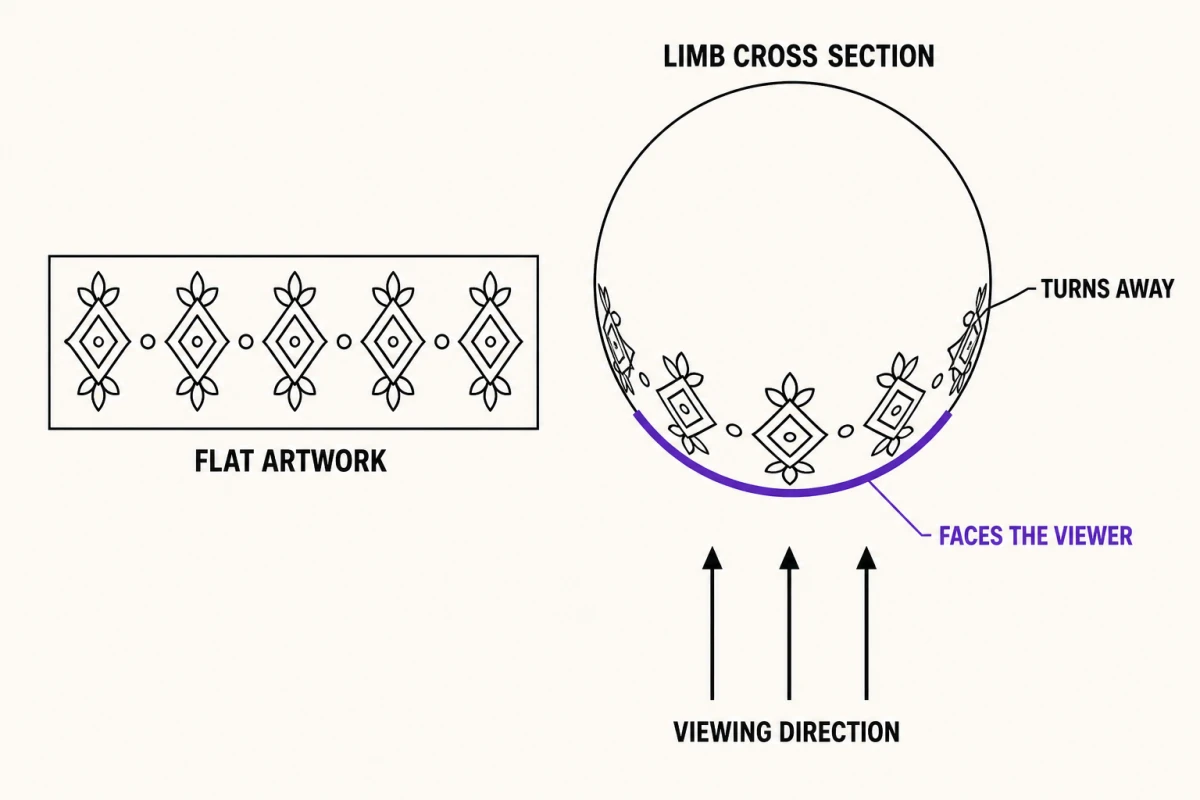
Curvature is the first variable. A forearm, a calf and a wrist are close to cylinders; a ribcage, a shoulder and a hip are compound curves that bend on two axes at once. On a cylinder, roughly the middle third of the circumference faces any single viewpoint, and everything beyond that turns away. For a forearm measuring somewhere around 25 cm around, that is about 8 cm of design width that stays flat to a viewer — push wider and the outer edges are seen edge-on, permanently foreshortened. Nothing is wrong with that, but it has to be a decision rather than a surprise, because a symmetrical design centered badly on a cylinder never looks symmetrical again.
Viewing angle is the second. Placements are not seen from the same place. An inner forearm is viewed nearly straight-on by the wearer and at a steep angle by everyone else. Ribs are almost never seen straight-on by anyone, including the wearer, who meets them at an angle in a mirror. A calf is usually seen from behind and below. Composing for a viewpoint that does not exist is one of the most common ways a good design becomes a mediocre tattoo, and it is exactly the failure a placement-specific render surfaces early.
Scale relative to a landmark is the third. The eye does not read a tattoo in centimeters; it reads it as a proportion of the body part it sits on. The same 14 cm piece is a statement on a wrist, a comfortable panel on a forearm, and a small accent on a thigh. This is why previewing against a placement is more informative than previewing against a blank rectangle, and why a size that felt settled in the abstract often moves once you see it in position. If it moves late, the size-change situation page covers what has to be reworked before the session.
Orientation is the fourth and the easiest to get wrong. Deciding whether the top of the design points toward the shoulder or the hand, and whether it reads correctly to the wearer or to an observer, is a real choice with no default answer. Make it in the preview, then mark the top edge on the printed stencil so the decision is not relitigated with pigment on the skin.
Placement notes worth checking in the preview
InkLine’s Tattoo to Skin mode offers 10 placements, each on a male or female body. What follows is what to look for in each, and where the render stops being informative. Because the body is generic, treat every row as a question about the placement in general, not about the person in front of you.
| Placement | Curve and usual viewing angle | What the preview will not tell you |
|---|---|---|
| Forearm | Near-cylinder, seen straight-on by the wearer, obliquely by others | How much width disappears around the sides |
| Upper arm | Cylinder that changes diameter under load; seen from the side | How the shape shifts when the muscle is flexed |
| Wrist | Tight cylinder with bone close to the surface | Whether fine detail survives at this scale |
| Chest | Compound curve, largely symmetrical, seen straight-on | How much the design drops or spreads with posture |
| Ribs | Compound curve, oblique view, moves with breathing | Real length once it follows the body’s contour |
| Back | Large, wraps at the flanks, seen straight-on | Where the piece stops being visible from the front |
| Thigh | Broad cylinder, seen from front or side, not both | Which face of the leg the design belongs on |
| Calf | Cylinder with a strong taper, usually seen from behind | How the taper skews a rectangular composition |
| Neck | Tight compound curve, seen from every direction | How it looks with the head turned |
| Hand | Multiple small planes and constant motion | How linework behaves across knuckles |
The pattern across the table is consistent: previews are strong on composition and weak on geometry. The cylindrical placements are the more forgiving of the two groups, which is part of why the forearm is the standard first commission, while the ribs reward measuring twice.
From preview to the check that actually decides it
The useful sequence is short. Settle direction in the preview. Produce the real artwork — a generated design, or a photo processed into linework. Set the finished size in centimeters or inches, not in pixels or in percent. Print at true size on plain paper. Cut it out and hold it on the placement in front of a mirror, at the angle other people see you from, with the limb in a natural position rather than held out for inspection.
That paper cutout answers everything the render could not. It curves the way skin curves. It tells you that a design measured at 18 cm on a flat sheet needs closer to 20 cm of line to cover the same visual span once it follows a ribcage. It shows you where an edge collides with a joint crease. It costs one sheet of paper and about two minutes, and skipping it is the single most common reason a stencil gets laid, peeled and redone.
InkLine’s AI design generation covers the first half of that sequence: Tattoo Design turns a text prompt into a design in one of 16 styles, Stencil to Tattoo colors an existing stencil, and Tattoo to Skin renders the design on a generic body at one of 10 placements. Each result runs over the network and uses a credit. The manual half is local: processing, editing, sizing, print layout and export all run on the device. They are free up to an allowance on how many images you carry through the workflow; past that allowance they need a subscription.
Where an on-skin preview will mislead you
It is generated imagery, not a photograph of a healed tattoo. Every on-skin preview is a picture an AI model has constructed, of your design on a body that is not yours. It is not documentation of how ink behaves in your skin.
It shows day-zero line. Renders are crisp and evenly saturated. Real line spreads a little as it heals, and gaps under about a millimeter tend to close. Dense detail that reads perfectly in a preview at 7 cm can turn into a solid patch at 7 cm on a body over a few years.
It does not measure curvature. This is the honest limit, and it is worth stating plainly: the preview is an AI-generated visualization on a generic body part, not a measurement of how a design sits on a curved surface. Anything that depends on real geometry — fit, wrap, edge placement, true length — belongs to the tape measure and the printed stencil.
It does not know your body. The render uses a generic male or female body at the placement you pick, not a photo or scan of you. Your proportions, existing tattoos, scars, stretch marks, hair and skin tone all change how a design has to be drawn, and none of them are in the render.
It is not artist approval. An artist will move a design two centimeters for reasons about flow, muscle and healing that no preview encodes. Bring the render as a starting point, not as a specification.
Used inside those limits, the preview does real work: it kills the wrong-size and wrong-orientation versions cheaply, before anyone has spent a deposit or a session on them. Then you print at true size and let the body have the last word.
Frequently asked questions
How accurate is an on-skin tattoo preview?
It is accurate about the things a picture can carry: whether the subject reads, which way it should face, and roughly how much of the limb it occupies. It is not a measurement. A render cannot tell you how a 20 cm design behaves across the compound curve of a ribcage, or where an edge lands relative to a bone, because it is drawing a plausible image of a generic body rather than projecting your geometry.
Does the preview use a photo of my own body?
No. InkLine's Tattoo to Skin mode takes your design and generates an image of it on a generic body part: you choose one of 10 placements and a male or female body. It is not a photo of you, not augmented reality and not a camera feature, so it cannot show your skin tone, existing tattoos, scars or proportions.
What is the best way to check tattoo size before the session?
Print the design at true size on plain paper, cut it out, and hold it on the placement in front of a mirror at the angle other people see you from. Measure the printed piece with a tape measure and the placement itself. Paper costs nothing and settles the argument that a screen cannot.
Why does the same design look different on ribs than on a forearm?
Two things change at once. The forearm is close to a cylinder viewed nearly straight-on, so the design stays roughly rectangular; ribs are a compound curve seen at an oblique angle, which foreshortens one axis and hides the far edge. The ribs also move with breathing and posture, so the shape you preview standing is not the shape you tattoo lying down.
Do I need an internet connection to generate an on-skin preview?
Yes. On-skin previews come from Tattoo to Skin, one of InkLine's AI modes, which runs over the network and uses a credit per result. The manual stencil workflow — processing a photo into a stencil, editing, print layout and export — is local image processing, and it is free up to an allowance on how many images you carry through it; past that allowance it needs a subscription.