
Print Tattoo Stencils From iPhone at True Size
Direct answer
Printing tattoo stencils from an iPhone comes down to two routes and one rule. The routes are AirPrint, which sends the sheet straight to a printer on the same Wi-Fi network, and export, which hands you a page-sized PDF you can email to a shop machine, move by USB, or take to a print shop. The rule is scale: the sheet has to print at 100%, never "Fit to Page", or the design lands on skin at the wrong size. InkLine lays the stencil out at the width or height you type in cm or inches, on US Letter, US Legal, Tabloid, A4 or A3, and prints a 5 cm check ruler on every sheet so a real ruler can prove the scale.
An iPhone can run the entire stencil print job: paper size, orientation, the design’s physical dimensions, line weight and the output itself. One setting decides whether the sheet is usable, and it is not resolution. It is scale. This page covers getting a stencil off an iPhone at the exact size you agreed on, what to do when there is no AirPrint printer in the room, and what thermal transfer paper actually needs from the machine feeding it.
Print at 100%, then check it with a ruler
The failure that ruins stencils is silent. When you print a bare image, such as a photo from the camera roll or a PNG someone sent you, the print system has no idea how large the design is supposed to be, so it scales the image to fill the sheet. You get a stencil that is 4% off, or 30% off, with nothing on screen to warn you. The client is in the chair before anyone notices the piece is too big for the space.
The fix is structural, not a checkbox. Print a document whose page is already the size of the paper, with the design placed inside it at its true dimensions. Then fit-to-page has nothing left to shrink, because the content is already exactly one page. This is the whole reason a stencil print layout exists, and it is why a page-sized PDF is a safer handoff than an exported image. InkLine builds the sheet this way: it trims the blank margins around the art, so the width or height you type is the size of the lines on paper, and it lays the stencil out from the paper’s corner at true scale rather than squeezing it into the printable area.
The working sequence:
- Set the physical size first. Type the width or height in centimeters or inches that you and the client actually agreed on; pinching the preview or dragging the slider resizes it too. The smallest stencil is 10 mm. Everything downstream inherits this number.
- Set the sheet to what is loaded in the printer. US Letter, US Legal, Tabloid, A4 or A3, portrait or landscape. Not what you usually use: what is in the tray right now.
- Print one proof on plain copy paper. Never make the first print on stencil paper. Copy paper costs nothing and catches every scaling problem.
- Measure the check ruler. Every sheet InkLine prints carries a 5 cm check ruler (2 in when you work in inches), captioned to print at 100%. Hold a real ruler against it, then measure the design’s longest dimension against the number you typed. Within about 1 mm is normal printer tolerance. Five millimeters or more means something rescaled and you need to find out what.
- Then load the real stock.
The ruler step takes fifteen seconds. Run it every time you print from an unfamiliar printer, a borrowed computer, or a new app; a scaling default only has to be wrong once.
Paper size and orientation set the ceiling
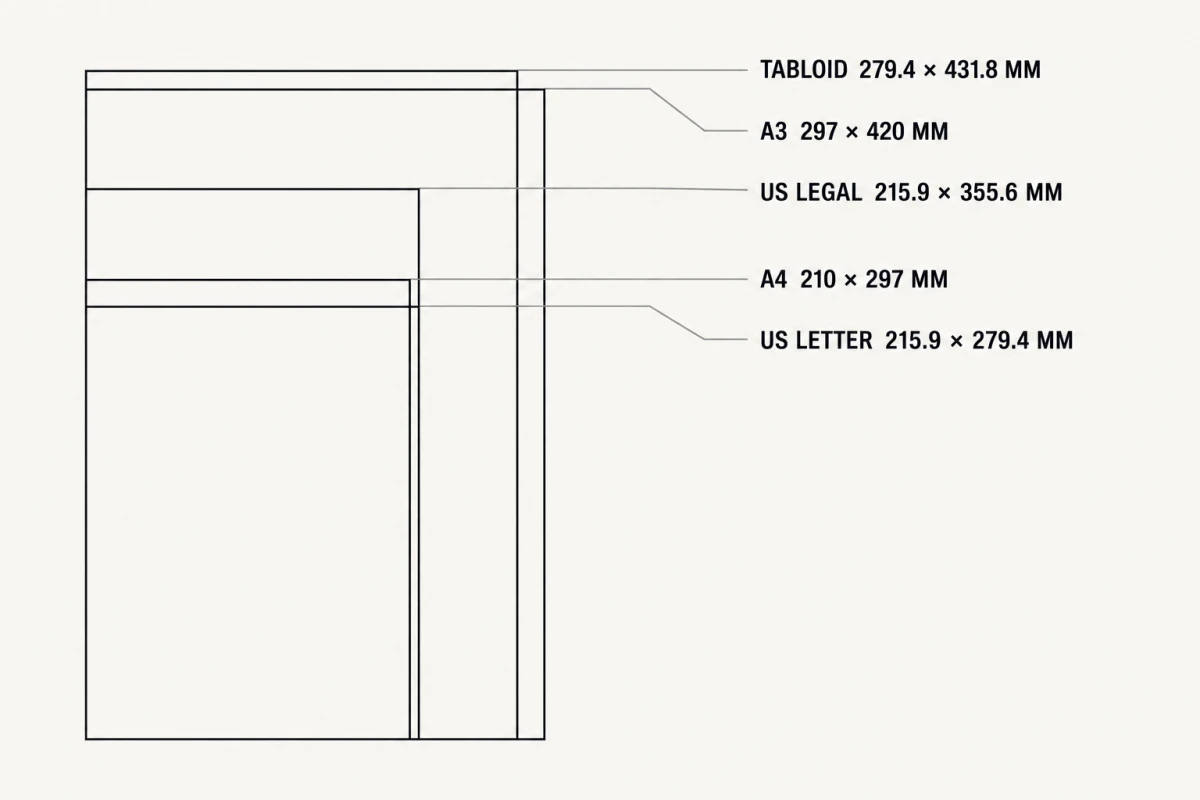
| Sheet | Millimeters | Inches | Where it fits |
|---|---|---|---|
| US Letter | 215.9 × 279.4 | 8.5 × 11 | Default stock in the US; wider and shorter than A4 |
| US Legal | 215.9 × 355.6 | 8.5 × 14 | Letter’s width with 76 mm more length, for long forearm and calf pieces |
| Tabloid | 279.4 × 431.8 | 11 × 17 | Single-sheet thigh, ribs and back panels on US large-format printers |
| A4 | 210 × 297 | 8.3 × 11.7 | Default nearly everywhere else; narrower and taller than Letter |
| A3 | 297 × 420 | 11.7 × 16.5 | Single-sheet thigh, ribs and back panels, if the printer accepts it |
InkLine starts on US Letter in the US and most of the Americas and on A4 elsewhere, and you can switch to any of the others. Letter and A4 look interchangeable and are not. Letter is 5.9 mm wider and 17.6 mm shorter. A design that fills the height of an A4 sheet has nowhere to put its bottom 17.6 mm on Letter. Most print drivers respond to that kind of mismatch by shrinking the entire page, which drops you back into the wrong-size problem, quietly. InkLine handles it differently: if the printer ends up with different paper than the one picked in the app, the job is re-tiled for the real sheet at the same size instead of being scaled. The stencil keeps its size, but it may arrive on more sheets than you expected, so match the app’s paper setting to the physical stock every time.
Orientation is a real lever, not a formality. Portrait on A4 gives you 297 mm of vertical run for a forearm or calf piece. Landscape on Letter gives you 279 mm of width for a horizontal band or a chest sweep. Rotating the sheet is usually cheaper than tiling.
Budget for margins as well. Consumer inkjets and lasers reserve an unprintable border, commonly 3 to 5 mm on three edges and more along the trailing edge. InkLine keeps a 5 mm margin and warns you when part of the stencil sits in that edge zone; anything a printer physically cannot reach is clipped rather than the whole design being shrunk. Borderless modes usually solve the margin problem by scaling the page up slightly, which is exactly what you do not want.
Line weight, multi-size and mirror
Three settings on InkLine’s print screen change what lands on the paper beyond its size.
Line weight. Scaling a stencil scales its lines: blow a design up three times and a 0.4 mm line prints 1.2 mm; shrink it and fine lines break up. The LINES setting offers As drawn, which lets the lines scale with the stencil, or Fine (0.3 mm), Medium (0.4 mm) and Bold (0.5 mm), which redraw the stencil for its print size so the lines come out at that width whatever size you print. For a design resized late, that is often the difference between a clean transfer and one that is suddenly too heavy or too faint.
Multi-size sheet. When the exact size is still being argued, the MULTI-SIZE option prints four copies of the design at 100%, 95%, 88% and 80% in a 2 × 2 block on one sheet, so you can hold each against the client and choose. The copies are not labeled on the sheet, so mark which is which before you cut them apart.
Mirror. Mirroring on the print screen flips the printed output. Use it only when your transfer method calls for a reversed original, and check any lettering on the plain-paper proof before it reaches stencil stock.
Route one: AirPrint straight from the iPhone
Direct printing from iOS requires an AirPrint-capable printer on the same network. That is a hardware requirement, not a setting you can talk your way around: iOS does not install printer drivers, so a printer without AirPrint will not appear in the print sheet no matter what you do on the phone. Most printers sold in the last decade support it; many older office and thermal machines do not.
When you have one, the order of operations matters. Set the sheet size and design dimensions in the app first, then open the print sheet, then confirm the printer’s own paper-size option matches. Check quality settings too: draft and eco modes produce broken, dithered lines that transfer badly, so use normal or best on a plain-paper setting.
Route two: PDF and PNG export for everything else
No AirPrint printer is not a dead end. Export the sheet and the phone becomes a layout tool rather than a print server:
- PDF to a shop computer. Export PDF produces the layout at the chosen paper size. AirDrop, email or Files, then print from Preview with Scale set to 100%, or from Acrobat with Page Sizing set to Actual Size. Both default to fitting, so change it explicitly.
- PDF to a print shop. Hand over the file and say: 100%, no scaling, no borderless. Copy shops fit to page by default because that is right for almost every other job.
- PDF via USB. Move the file to a computer and print through whatever driver that machine has, including printers iOS cannot see at all.
- PNG of the stencil. From the export screen, share it or save it to Photos, optionally with a transparent background (lines only), which is what you want for Procreate or a mockup. Understand the tradeoff: an image carries pixels, not page dimensions, so whatever software opens it decides the scale. For anything that has to come out at a measured size, send the PDF.
For a fuller walkthrough of the home setup, including stock and transfer, see how to print a tattoo stencil at home.
What thermal transfer paper needs from the printer
Thermal stencil paper is a multi-ply sandwich with a carbon sheet, and it forms its image with heat rather than ink. That single fact governs the whole workflow: you cannot feed it through an inkjet and get a stencil. It needs a thermal copier or a thermal stencil printer, and those machines want one of two things: a physical paper original to scan, or a job sent from a connected computer. Some newer units accept mobile printing; plenty still expect USB.
So what the paper needs from your printer is usually indirect. Print a true-size original on plain paper with solid, unbroken black lines at normal or best quality, then run that original through the thermal machine at 100%. If the copier has its own enlarge or reduce setting, that is a second place scaling can go wrong, so check it before the first pass; the check ruler survives the copy, so measure it on the thermal sheet too. Hectograph and freehand papers are different again, since they are traced by hand rather than printed, which is covered in tattoo stencil paper explained.
Being straight about the limit: InkLine produces a correctly sized, high-contrast original. It does not replace a dedicated thermal stencil printer for shop-volume work, and no phone app does.
Designs larger than a single sheet
A back piece, a full thigh panel or a long ribs script will not fit on A4 or Letter, and Tabloid or A3 only buy you so much. Tiling splits the design across several sheets that share an overlap strip, which is how large stencils have always been assembled. InkLine handles the split once you set a size larger than the sheet: up to 3 × 3 sheets, with AUTO picking the fewest, a 15 mm shared strip, three circle-and-cross registration marks and a dashed cut line on every seam, and a label such as A1 · 1/4 on every sheet. The details are covered in multi-page stencil tiling.
The scaling rule applies with more force here, not less. Every tile has to print at the same 100%, or the seams will not meet, and a 2% error that is invisible on one sheet becomes a visible 8 mm step across four. Measure the check ruler on the first sheet before you print the rest.
When the print comes out wrong
| What you see | Likely cause | Fix |
|---|---|---|
| Check ruler short of 5 cm, wide white border | Fit-to-page scaling in the print dialog or on a shop computer | Print the page-sized PDF, set 100% or Actual Size |
| More sheets than expected | App set to one paper, printer loaded with another, so the job was re-tiled | Match the app’s paper size to the loaded stock |
| Gray, dotted or broken lines | Draft or eco mode, low toner, glossy media setting | Normal or best quality, plain-paper media, check consumables |
| Lines far heavier or thinner than expected | Design printed much larger or smaller than it was drawn | Set LINES to Fine, Medium or Bold for the print |
| Lines dissolve at small detail | Source photo below roughly 1000 px on the long edge | Reshoot; see photo resolution for tattoo stencils |
| Paper sheet correct, thermal copy smaller | Reduction setting on the thermal machine | Set the copier to 100% and re-run |
Two of these are the same mistake wearing different clothes: something in the chain decided to be helpful about size. The way to catch it is the plain-paper proof and the check ruler, before stencil stock, and before the client is on the table.
Frequently asked questions
Do I need an AirPrint printer to print tattoo stencils from my iPhone?
Only if you want to print directly from the phone. iOS has no generic driver system, so direct printing requires an AirPrint-capable printer on the same network. Without one, export a PDF and print it from a computer, a shop machine, or a print shop instead.
Why does my stencil print smaller than the size I set?
Almost always fit-to-page scaling. If you print a bare image, the print system stretches or shrinks it to fill the sheet because the image carries no physical size. Print a page-sized PDF and set the print dialog to 100% or Actual Size. On an InkLine sheet, the 5 cm check ruler tells you at once: if it does not measure 5 cm, something rescaled the job.
Can I print on thermal stencil paper with a home inkjet?
No. Thermal stencil paper forms its image with heat, not ink, so it needs a thermal copier or a thermal stencil printer. The practical route is to print a true-size original on plain paper and run that original through the thermal machine, or trace it onto hectograph paper.
What paper size should I use for a forearm stencil?
US Letter or A4 covers most forearm work, since both give you more than 270 mm of length in portrait. US Legal adds another 76 mm of length at Letter's width, and Tabloid or A3 cover longer pieces if your printer takes them; beyond that, tile across sheets.
Does printing from the app cost anything?
InkLine is a free download, and the manual stencil workflow, meaning processing, editing, print layout and export, is free up to an allowance on how many images you carry through it; past that allowance it needs a subscription. AI generation runs on a separate credit system, but nothing in the print pipeline depends on it.