
Apprentice, first stencil
How to Make Your First Tattoo Stencil as an Apprentice
Direct answer
To make your first tattoo stencil as an apprentice, draw the design first, size it to the placement before you clean anything up, and check line weight on a physical print rather than on screen. Mentors send first stencils back for three things far more often than for style: broken lines, wrong size for the spot, and detail packed too tight to hold. Print at final size on transfer paper, apply it to practice skin, and bring the paper stencil plus the measurement to review. Tools like InkLine handle the sizing, cleanup and print layout; the drawing is still yours to earn.
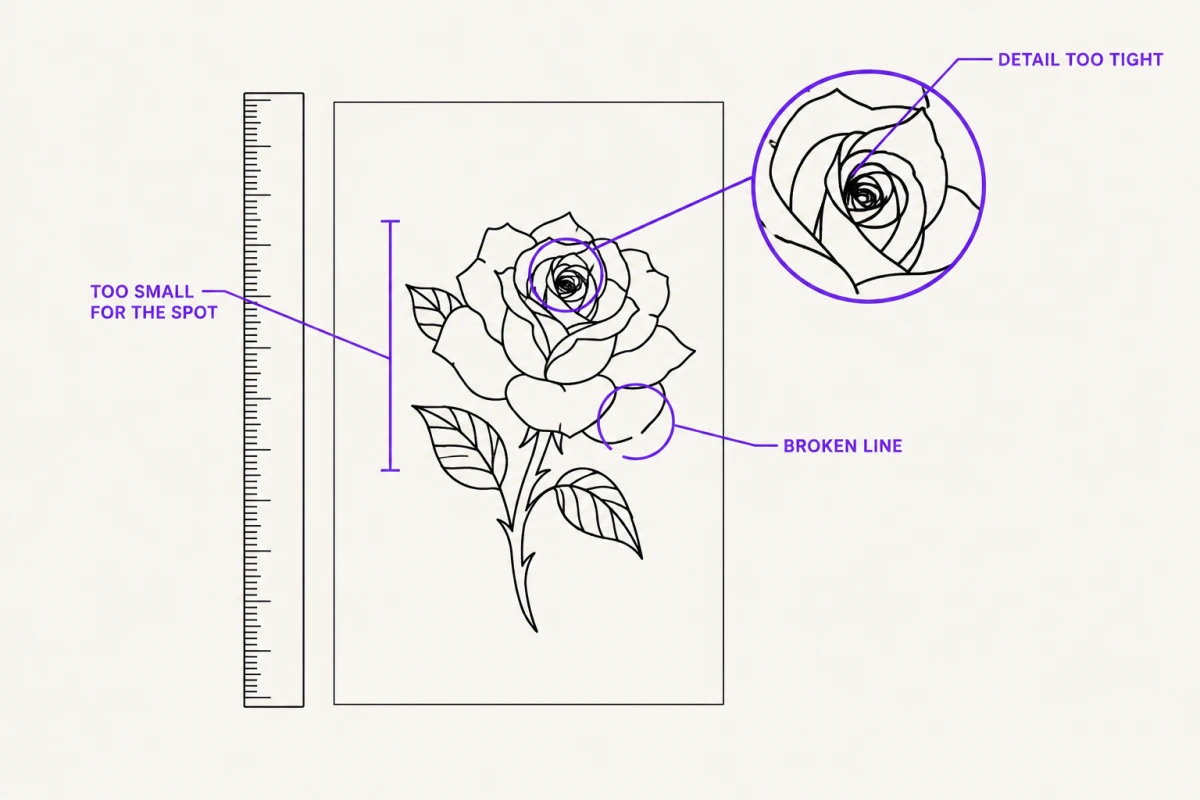
Most first stencils come back for the same three reasons: the lines break up, the design is the wrong size for the spot, and there is more detail packed in than skin will hold. None of those are talent problems. They are process problems, and you can catch all three yourself before you ever hand the paper over.
What your mentor is actually checking
A stencil is not judged as artwork. It is judged as a set of instructions you are handing to yourself at the machine, six weeks from now, with a nervous person under your hand. So your mentor reads it as a plan for a tattoo, and checks the things that decide whether that tattoo is physically possible.
| What they check | Passes | Gets sent back |
|---|---|---|
| Line continuity | Every line closes or ends on purpose | Lines fade out, dot apart, or double back on themselves |
| Size | Printed at final size and held against the actual spot | Sized on screen only, never measured |
| Line weight | Thinnest stroke still clearly visible on paper at arm’s length | Hairlines that disappear when you step back |
| Detail density | Roughly 2 mm of clear space between neighboring lines | Detail that closes into a solid patch |
| Flow | The design follows the limb’s axis and curve | A flat rectangle of art pasted onto a round surface |
| Readability | You can read it upside down, from three feet away | You have to lean in to tell which line is which |
The fastest self-check is the wall test. Print the stencil at final size, tape it to a wall, and back up six feet. Anything you cannot resolve from there is detail you will not be able to place accurately, and it is detail that tends to merge as the tattoo ages. Lines that sit under about 2 mm apart in small work often read as one thicker line within a few years. Cutting that detail is not lowering your standard; it is the standard.
The second self-check is the honest one. Cover the stencil and try to redraw its main shapes from memory. If you cannot, the design has no readable structure yet, and no amount of processing will give it one.
A first workflow that holds up
Work in this order. The most common apprentice mistake is starting from a photo and hoping the processing will produce a design.
- Draw it. On paper or on a tablet, by hand. If you are working from a reference photo, the photo is reference — it informs the drawing, it is not the stencil. If you do process a photo directly, know what that gets you and what it does not: see making a stencil from a photo.
- Measure the placement before you clean anything. Flexible tape on the practice skin or the limb, and write the number down in plain language: “14 cm tall, outer forearm, elbow to mid-forearm.” Every later decision depends on that number, and it is the number your mentor will ask for first.
- Convert to line. Scan or photograph your drawing in flat, even light, then extract the linework. Contour-heavy pieces want a straight line pass; stippled and shaded designs need a different treatment, which is covered in which stencil mode for which design.
- Clean up by hand. Automatic cleanup kills speckle and stray marks. It does not close a gap in a line that matters. Zoom in, find every break, and close it yourself with a pen brush.
- Print at final size. Not “roughly.” Set the sheet, set the dimensions, and print. If the design is taller than one sheet, tile it across two or three and tape the pages before you cut.
- Apply, dry, and look at it cold. Transfer to practice skin, let it set the full recommended time, then walk away for ten minutes and come back.
InkLine covers steps 3 through 5 on an iPhone or iPad: six stencil modes, Detail, Intensity and Cleanup sliders, Apple Pencil editing for closing gaps — with your original drawing available under the stencil as a guide while you work — and print layout at a size you type in centimeters or inches, on five paper sizes, with a 5 cm check ruler on every sheet and multi-page tiling for designs bigger than one sheet. The download is free, and the manual stencil workflow — processing, editing, print layout and export — is free up to an allowance on how many images you carry through it; past that allowance it needs a subscription, and the AI generation features use a credit system. That is worth knowing before you plan a week of practice, because practice means processing image after image — check where the allowance sits in the app rather than assuming. What it does not do is step 1.
Check line weight at print size, every time
This is the habit that separates a stencil that transfers from one that ghosts. On screen you are usually looking at the design two to four times larger than it will print. A stroke that reads as confident and solid at that zoom can land on paper at 0.2 mm — thin enough that the transfer picks up maybe half of it, and thin enough that a needle grouping cannot follow it accurately anyway.
So print, then put a ruler on the thinnest line in the piece. If you cannot see that line clearly from arm’s length, go back and thicken it. Do this on every stencil until you stop being surprised, which takes most people about twenty prints.
InkLine’s print screen has a line-weight setting that redraws the stencil for its print size at fine 0.3 mm, medium 0.4 mm or bold 0.5 mm, and when you leave lines as drawn it warns if they will print thinner than 0.2 mm, so a hairline is hard to sneak onto the sheet by accident. Use it, but learn to see the problem with a ruler first: your mentor will hand you drawings and prints that did not come out of an app, and the habit has to live in your eye.
The related failure is lines that transfer and then fall apart during the session. That is usually a stencil problem, not an application problem, and the causes are mechanical and fixable — why stencil lines break up walks through them.
Practice skin, and what it will not tell you
Synthetic practice skin is worth the money, and it is honest about a narrow set of things. It will show you whether your transfer technique works, whether your line weight survives, whether the stencil is legible once it is blue on beige instead of black on white, and whether it holds up to soap and a wipe.
It will not tell you about curvature, stretch, or motion. Practice skin is flat and static. A design that sits perfectly on a sheet can pull sideways across a forearm or fold at the inner elbow. So do both: transfer to practice skin for technique, and transfer the same stencil onto your own forearm or thigh to see what the curve does to it. Photograph it from three angles.
On-screen placement previews, InkLine’s on-skin preview included, are a planning aid for the same reason — InkLine’s is an AI-generated image of the design on a generic body part, and it shows you scale and rough position, not how the design behaves on a moving limb. If you are adapting a design to a curve, tracing from a reference overlay directly onto the skin is a legitimate technique and worth learning early: see freehand tracing onto skin.
What to bring to review
Show up with paper, not a phone. Your mentor needs to hold the stencil against the spot, turn it, and squint at it. Bring:
- The stencil printed at final size, plus one copy 10% larger and one 10% smaller. Being asked “what if it were bigger” and having the answer in your hand reads as preparation. A multi-size sheet, which InkLine prints as four copies at 100, 95, 88 and 80 percent on one page, covers the smaller side in a single print.
- The original drawing, so they can see what you decided versus what the processing decided.
- The measurement, written down, with the placement named.
- The reference and where it came from. Be able to say it.
- A photo of the stencil applied — practice skin and your own skin, if you can.
- Three questions, written. Not fifteen.
Expect the first review to be short and mostly about size and density. That is normal, and it is not a verdict on your drawing.
The part no app does for you
Your mentor is testing line control, composition, and whether you understand how a design sits on a body. Those are drawing skills, built by drawing every day, and no processing tool supplies them — not InkLine, not anything else on the App Store. A clean extraction of a weak drawing is a clean weak drawing, and it reads that way on paper immediately.
Two more limits worth knowing now. A low-resolution reference — under roughly 1000 px on the long edge — cannot be converted into usable linework by any amount of processing; you will end up redrawing it, so start by redrawing it. And a phone-plus-inkjet setup is a practice and small-batch answer, not a replacement for a dedicated thermal stencil printer once you are producing shop volume.
Finally, before any stencil goes onto a real person: apprentice rules differ significantly by state and by country, covering supervision, licensure, bloodborne pathogen certification, and in some places registration before you touch a needle at all — including on a friend, unpaid. Ask your mentor, and check your local health authority directly. Getting this wrong can end an apprenticeship before the drawing ever gets a chance.
What this cannot fix
- No app substitutes for drawing fundamentals. Your mentor will test line control, composition and flow by hand, and processing a photo will not hide a weak drawing underneath.
- Rules on who may tattoo, on whom, and under what supervision vary by state and country. Check your local regulations and your shop's policy before any stencil goes on real skin.
- Below roughly 1000 px on the long edge, a reference photo cannot be rescued into a clean stencil. At that point you are redrawing, not converting.
- The on-skin preview is a visualization, not a measurement of how a design sits on a curved, moving surface. Paper on the actual limb is still the test.
Frequently asked questions
How big should my first stencil be?
Big enough that no two lines sit closer than about 2 mm at final size. For most first pieces that means 10–15 cm on the long edge, not 5 cm. Small work packs detail tighter, which is harder, not easier.
Do I need a thermal printer to make my first stencil?
No. A home inkjet or laser printer and hand-traced transfer paper will get you through the practice phase. A dedicated thermal stencil printer earns its place once you are running shop volume and need identical transfers quickly.
Should my first stencil include shading?
Keep shading out of the stencil itself. Map the linework and, at most, mark shadow zones as loose outlined shapes. Stencils that carry rendered gray tone read as mud once they are on skin and wet with soap.
Can I trace a design I found online for practice?
Not for anything you show as your own or put on a person. Tattoo flash and artwork are copyrighted, including work labeled free. Use your own drawings, or reference from public-domain and licensed sources, and be able to say where a reference came from.
My printed lines look thinner than they did on screen. What went wrong?
Nothing broke. You were viewing the design zoomed in, where a hairline reads as a solid stroke. On paper at final size the same line may be under 0.3 mm and will drop out in transfer. Raise line weight to about 0.4 mm, which is InkLine's Medium setting, and reprint.