
Geometric
Geometric Tattoo Stencil: Precision Linework That Transfers Clean
Direct answer
A geometric tattoo stencil is judged on precision rather than on style: straight lines have to stay straight, circles have to stay round, and mirrored halves have to match, because a 1 mm drift across a 100 mm design reads as a mistake rather than a variation. Extract it in Linework mode with Detail high and Cleanup low so every vertex survives, keep line weight identical across the whole design, and build symmetric halves by mirroring one half in the source drawing rather than by hand. InkLine's mirror then serves as the check: flip the whole stencil and compare.
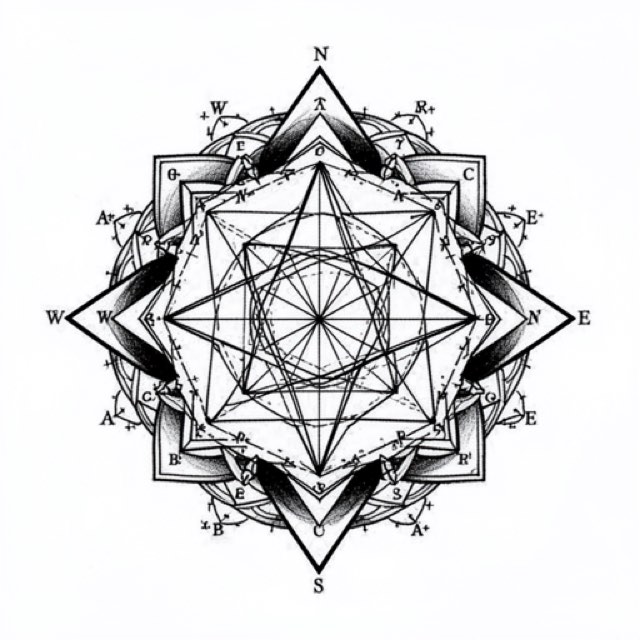
Geometric work is the one tattoo style where the stencil is not a suggestion. A traditional rose can land a few millimeters off and still be a rose. A hexagonal lattice that lands a few millimeters off is visibly broken, and everyone who looks at it will register the error without being able to name it. Everything below is about protecting that precision from the moment you extract the stencil to the moment it lifts off the skin.
The one-millimeter rule, and how to hold it
The eye does not measure a geometric line. It compares that line to the one beside it, and comparison is brutally sensitive. A gap that runs 3 mm at one end of a design and 4 mm at the other is a 1 mm error, roughly 1% across a 100 mm piece, and it is instantly legible as a converging wedge. The same 1 mm inside a script banner or a bunch of leaves disappears completely. That asymmetry of tolerance is the whole reason geometric stencils are made differently.
A working recipe that holds it:
- Start above 1500 px on the long edge. Below roughly 1000 px a photo cannot be rescued into a clean stencil; you are redrawing, not converting. The optional 2x upscale on import gives the tracer more pixels on a borderline source, but it resamples rather than adds detail, and it will not recover a vertex that was never captured.
- Extract in Linework mode. Solid traced lines are the format geometric design already lives in, and Linework holds the short segments that Outline’s coarser trace can lose.
- Push Detail up first, then back it off until stray paper texture and pencil ghosting drop out. Detail is what keeps short segments, tick marks and tight corners alive.
- Keep Cleanup low. Cleanup is genuinely useful on organic subjects, and it applies to Linework, Sketch, Denoised and Outline. On geometry it is a liability: it closes small gaps and absorbs short segments, and in a geometric design the short segments are the design. A rounded corner is a broken corner.
- Inspect at 100% zoom in three places before you print: the sharpest vertex, the thinnest line, and the tightest pair of parallels. If those three survive, the rest will.
- Repair rather than re-extract. One soft corner is a ten-second fix with the Pen brush, the ruler and an Apple Pencil. Re-running extraction at a different setting to save that corner usually costs you two others.
Build symmetry instead of hoping for it
Most geometric designs are symmetric about at least one axis, and hand-cleaning both halves is the single biggest source of drift. Clean one half properly, then mirror it — in the drawing app you built it in, before import, because InkLine’s mirror flips the whole image rather than copying one half onto the other. The halves now match because they are the same geometry, not because you were careful twice.
That reduces inspection to one line. Every error the mirror can produce lives on the seam: a doubled center line, a 0.5 mm overlap, a gap where the two halves fail to meet. Look at the seam, fix it once, and the piece is symmetric.
The trap sits upstream. If your source is a photo of a drawing shot at even a slight angle, the image is keystoned before you ever open it. A circle photographed off-axis is an ellipse, and mirroring an ellipse gives you a perfectly symmetric wrong shape. Shoot flat-on with the camera parallel to the paper, or scan it. InkLine’s mirror and flip handle the practical stuff: flipping the whole stencil and stepping back along the history timeline to compare is a fast symmetry check, and flipping horizontally for a reverse transfer is harmless on a symmetric design, but check any element that only appears on one side first. Each step is kept on that timeline, so a mirror you dislike costs nothing to undo.
Why Linework is the mode for this style
| Mode | What it does to a geometric design | Verdict |
|---|---|---|
| Linework | Traces solid black lines along the contours; near-black shapes stay solid | The default. Line is the entire vocabulary of the style |
| Outline | Contour lines only, coarser and stricter than Linework | For bold, simple structures; can drop short segments and tick marks |
| Denoised | Linework run on a noise-reduced, lightly smoothed copy | The rescue pass when a phone photo’s grain makes Linework speckle |
| Sketch | Pencil look, with shading kept as gray | Rarely right — carries paper tone and shadow you then have to erase |
| Tonal | Shadow map: dotted lines at each shadow level, hatching in the darkest | Only for shaded forms such as faceted solids; boundaries still want Linework |
| Dotwork | Traced outlines plus stipple dots, denser where darker | For stippled fills in sacred-geometry-style pieces |
The common case worth planning for is a hybrid: crisp linework holding a structure of nested polygons, concentric rings or a tessellated field, with stippled tone filling some of the cells. Dotwork traces outlines along with the dots, so one Dotwork pass often carries both; InkLine does not merge two modes into one stencil, so where the Dotwork frame is softer than the Linework one, redraw those edges with the Pen and the ruler rather than trying to combine passes. Note that Cleanup is unavailable in Dotwork and Tonal, so the noise control has to happen before you get there. If you are unsure which way a specific design leans, which stencil mode for which design walks the decision without assuming a style.
Line weight, gaps, and what survives the transfer
Uniform line weight is not a detail of geometric work, it is the look. Variable weight reads as hand-drawn, which is a virtue in sketch or neo-traditional styles and fatal here. When you repair a stencil by hand, match the existing weight rather than what looks good in isolation.
Transfer adds thickness. Hectograph and thermal lines both gain a little on skin, and the gain comes out of the gap, not the line. Two 0.4 mm lines sitting 1 mm apart on paper can arrive with a 0.6 mm gap that closes into a single band the moment you start working. Print at exactly 1:1, measure with a ruler on the sheet rather than trusting the screen, and treat roughly 0.8 mm as the practical floor for a gap between parallels at stencil scale.
Print scaling is the other quiet killer. Any “fit to page” or “scale to fit” option in a print dialog will resize a design by a percent or two, which is invisible on a photograph and destroys a piece sized to a body landmark. InkLine lays the page out from the paper’s corner at true scale rather than shrinking it to the printable area, and prints a 5 cm check ruler on every sheet, so a stray scaling setting shows up as a ruler that does not measure 5 cm. For a mandala or a large lattice that exceeds one sheet, tile it: up to 3 × 3 sheets of US Letter, US Legal, Tabloid, A4 (210 × 297 mm) or A3 (297 × 420 mm), portrait or landscape, exported as a PDF at that paper size or printed directly. The multi-page tiling guide covers the alignment method. The short version is that seams should be joined on their registration marks and against a long straight element that crosses them, checked as a taped master, and then transferred section by section.
Placement: flat planes flatter geometry
Curvature is a geometric design’s natural enemy, because the viewer knows what a circle is supposed to look like. On a strongly cylindrical surface a circle photographs and reads as an ellipse from every angle except one. Flatter planes — the outer forearm, the outer thigh, the upper back, the sternum, the flat of the calf — let a symmetric design stay symmetric from normal viewing distance.
Tapered and high-movement areas need the design adapted rather than shrunk. The wrist is the classic example: the circumference changes across a few centimeters, so a band that is a true circle at one end is not at the other. The honest test is physical. Place the stencil, have the person move through their normal range, and look at it from three angles before you commit. InkLine’s on-skin preview is helpful for composition, but it is a visualization, not a measurement of how a design sits on a curved surface.
Aging, and the limits worth stating
Geometric work ages in a specific and predictable way, and being straight about it up front prevents a disappointed client at the five-year mark. Ink migrates slightly. Fine parallel lines under about 2 mm apart on skin tend to merge into a thicker band; dense stippled fields soften into flat gray; hairline lattices lose their airiness first. Solid shapes and heavier geometric blackwork hold their outline for far longer. Designing with that in mind means slightly wider spacing and slightly heavier line than the paper version wants, which is also the reason a stencil that looks marginally coarse on the sheet is often correct on skin.
Two limits on the tooling side. InkLine prints over AirPrint from an iPhone or iPad and does not replace a dedicated thermal stencil printer for shop-volume work, and AI generation needs a network connection while the manual pipeline — processing, editing, print layout and export — runs locally on the device. The app is a free download, that manual workflow is free up to an allowance on how many images you carry through it and needs a subscription past that allowance, and AI generation uses a credit system. The example image on this page is an AI-generated design rendered by the app, not a healed tattoo.
Free stencils to start this style from
Frequently asked questions
What is the best stencil mode for a geometric tattoo?
Linework, in almost every case. Geometric work is defined by contour and even line weight, and Linework traces solid black lines along the contours while holding the short segments and tick marks that Outline, which is coarser, can drop. Reach for Dotwork when the cells are stippled: it traces outlines as well as dots, so check its frame against the Linework pass and redraw any soft edge with the ruler.
How do I make both halves of a symmetric geometric stencil match?
Do not draw the second half. Clean one half until it is exactly right, then mirror it across the center axis in your drawing app so the halves match by construction; InkLine's mirror flips the whole image rather than copying one half. Any remaining error is concentrated on the seam line, which is one place to inspect instead of hundreds.
Why do my geometric stencil lines look wobbly after printing?
Usually the source, not the print. Below roughly 1000 px on the long edge a photo cannot be rescued into clean linework, and a heavy Cleanup setting rounds off vertices. Check the corners at 100% zoom before printing, and measure the 5 cm check ruler InkLine prints on every sheet: if it is off, something scaled the page.
Do geometric tattoos blur as they age?
Fine parallel lines are the part that ages worst. Ink spreads slightly over years, so lines sitting closer than about 2 mm on skin tend to merge into one thicker band. Solid geometric blackwork holds its shape far better than a hairline lattice.
Can I print a large geometric mandala at home?
Yes, by tiling it across several sheets. InkLine splits a design larger than one page across up to 3 × 3 sheets on any of its five paper sizes and prints them over AirPrint. Align each seam on its registration marks and a straight edge that crosses it, check the taped master, then transfer section by section.